Lead Generation
Find them. Spot them. Reach them. In one place.
Coffee builds lead generation into the CRM: Lead Finder to find people who fit, Visitor ID to see who's already on your site, and Campaigns to reach them from each seller's own mailbox. No CSVs between tools.
From anonymous visit to booked meeting.
Spot
See who's on your site.
Visitor ID turns anonymous traffic into named people and companies, and suggests who to contact.
Find
Build the list.
Lead Finder finds more people who match your ICP and buyer persona, from a plain-English search.
Reach
Start the conversation.
Campaigns sends AI-written sequences from each seller's own mailbox and stops the moment someone replies.
Visitor ID
Turn anonymous traffic into named leads.
Most companies have no idea who is browsing their website. With a single tracking pixel, Coffee identifies the person and the company they belong to, and tells you which two or three people at that company to contact.

Install the pixel
Drop a custom script into your site's head tag. Coffee verifies installation and starts identifying visitors immediately.
Know who visited
Name, title, email and LinkedIn profile, plus their company, the pages they viewed, time on site, and whether it was a first or returning visit.
Act in real time
Slack alerts surface high-fit visitors. One click adds them to Coffee with enrichment pre-filled, ready for a LinkedIn request, an email, or a Campaign.
Lists that build themselves
Identified visitors are added to company and people lists automatically as they appear.
Suggested Leads
Other visitor tools show you a company or a raw list of people. Coffee uses your buyer persona to recommend the specific two or three people at the visiting company you should reach out to, with their LinkedIn profiles ready.
Lead Finder
Describe who you want. Coffee builds the list.
Search Coffee's own database for people or companies that fit your ideal customer profile, without a separate prospecting subscription.
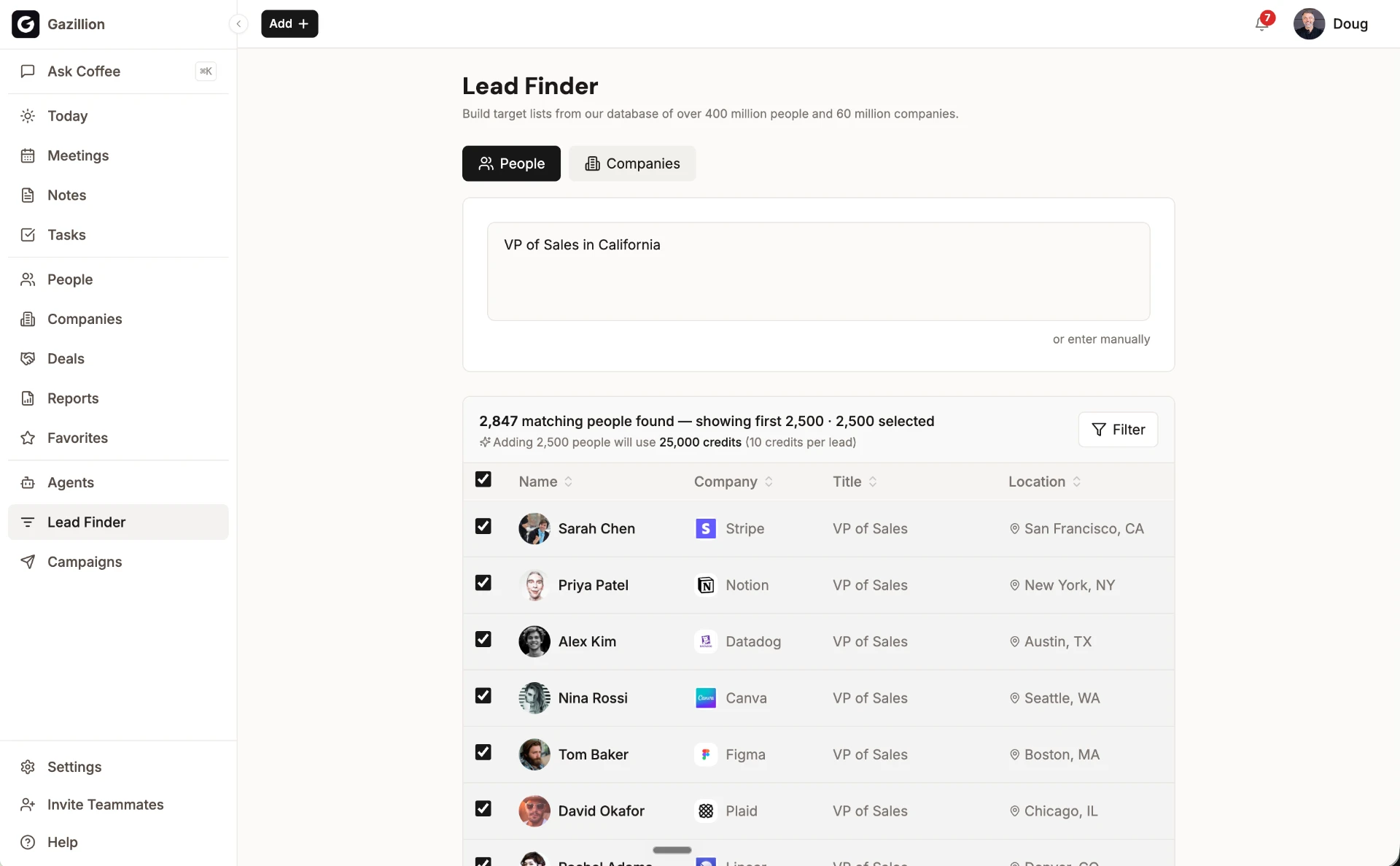
Natural-language search
"Find me VPs of Sales at SaaS companies with 50–200 employees." Prefer precision? Filter by industry, geography and job title.
Preview before you build
See how Coffee interpreted your request and a sample of matching results before the list is created.
ICP match ranking
Results are ranked against your ideal customer profile and buyer persona, so the best fits come first.
Lists that live in Coffee
Every list sits next to your other records, ready to enrich, track and enroll in a Campaign. No CSV exports.
Campaigns
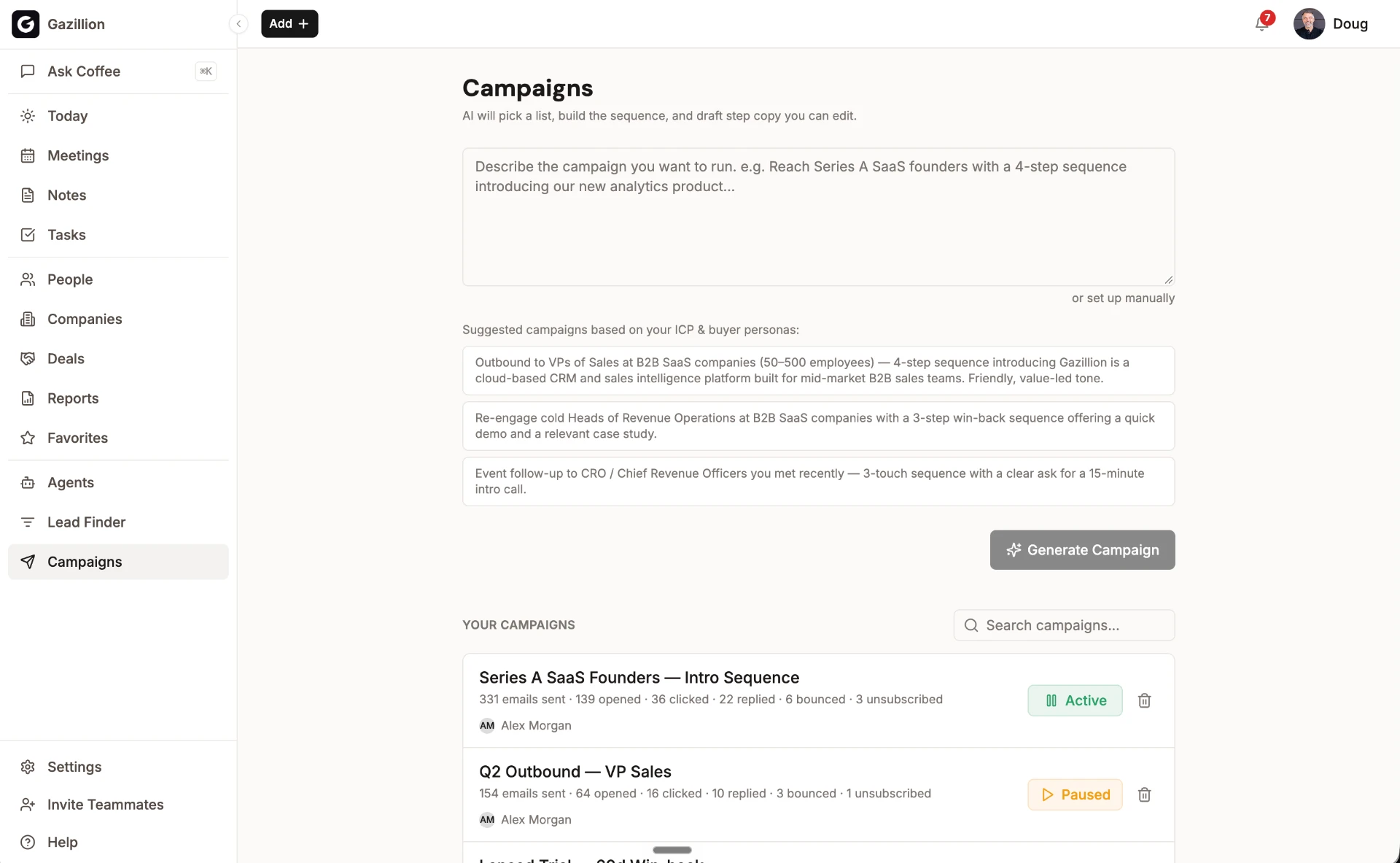
Outreach that sounds like your seller, because it comes from your seller.
Run multi-step email sequences natively. Send to any People list; dynamic lists enroll new contacts automatically as the campaign runs.
AI campaign generation
Describe it in plain English ("4-step outreach to webinar attendees introducing our analytics product") and Coffee writes the subject lines, copy and delays. Every step stays editable.
From a real mailbox
Emails send from each seller's connected mailbox with their real signature. Personalization variables (first name, company, title and more) have automatic fallbacks.
Stops when they reply
Stop-on-reply is on by default, so no one gets an automated email after a real conversation starts. Built-in throttling protects sender reputation.
Full control and stats
Preview before launch; pause, resume or delete anytime. See opens, clicks, replies, bounces and unsubscribes for each step, and exactly who received what.
One lead, start to finish.
- 1
A VP of Sales at a target account reads your pricing page. Visitor ID identifies her and posts a Slack alert.
- 2
Suggested Leads recommends two colleagues who match your buyer persona.
- 3
All three are added to a dynamic "High-fit visitors" list, already enriched.
- 4
The list feeds a 4-step campaign written by Coffee, sent from the account owner's mailbox.
- 5
She replies on step 2. Her sequence stops automatically, and the conversation shows up on her record.
What it replaces
| Job | Typical tools | In Coffee |
|---|---|---|
| Prospecting database | ZoomInfo, Apollo | Lead Finder |
| Website visitor identification | RB2B, Warmly | Visitor ID + Suggested Leads |
| Email sequencing | Outreach, Salesloft | Campaigns |
| Form-to-CRM routing | Form tools + glue | Website Forms |
| Moving leads between tools | CSV exports | Not needed — it's all one record |