The sales technology market has seen significant shifts in recent years, with customer relationship management (CRM) systems at the heart of this evolution.
Traditional tools, once the backbone of sales operations, now often feel like heavy machinery in a world demanding speed and agility. Sales teams grapple with disjointed workflows, manual data entry, and outdated interfaces, all while facing pressure to deliver measurable results in an increasingly competitive landscape.
Amid this, AI-first CRMs have emerged as a new category, built to address these inefficiencies by automating routine tasks and unifying scattered data into actionable insights.
Platforms like Coffee and Day.ai exemplify this trend, offering solutions that aim to redefine how sales teams operate. This guide provides a detailed comparison to help sales leaders navigate their options and select a tool that aligns with their unique needs.
Why AI-First CRMs Are Replacing Traditional Systems
Many sales teams find traditional CRMs like Salesforce and HubSpot cumbersome. Sales reps juggle platforms for data enrichment, outreach, and call recording, leading to fragmented workflows that reduce efficiency.
Manual data entry remains a persistent issue with older systems. Sales reps spend a notable portion of their time logging notes, updating records, and transferring email data, pulling focus away from direct customer engagement. Only about 35% of a rep’s time is spent on actual selling. This administrative load turns CRMs into a hindrance rather than a help.
Older CRM architectures, designed decades ago, also struggle to adapt to modern needs. Salesforce, for instance, carries technical limitations that hinder seamless AI integration or the handling of unstructured data like emails or call transcripts. HubSpot, while newer, faces challenges in unifying data across customer interactions. These systems, rooted in relational databases, can track historical trends with proper setup, but they often fall short without significant customization.
How AI-First CRMs Address Sales Challenges
AI-first CRMs rethink customer relationship management from the ground up. Unlike older systems retrofitted with AI features, these platforms are built with intelligence at their core, automating tasks and connecting structured data, such as contacts and deals, with unstructured inputs like meeting notes. This creates a more cohesive view of customer interactions.
Such systems focus on reducing manual work while delivering insights that boost revenue. They can automatically log customer data, prepare reps for meetings, summarize calls, draft follow-ups, and provide real-time pipeline analysis. By shifting focus from paperwork to relationship-building, these tools aim to enhance sales outcomes in meaningful ways.
What to Look for in an AI CRM Solution
Automation That Saves Time
AI CRMs should handle repetitive tasks to free up sales reps for higher-value work. Key features include automatic creation of contacts and companies from emails or calendars, logging activities without user input, and enriching data with relevant details. The goal is to minimize time spent on routine updates.
Meeting automation also matters. A strong platform offers pre-meeting summaries with customer context, records and transcribes calls, and creates post-meeting notes with action items. This ensures insights from conversations are captured without distracting reps from engaging with clients.
Unifying Data for Clear Insights
A solid AI CRM pulls together data from various sources into a single, clear picture of each customer. It processes unstructured information from emails or transcripts and links it to structured records. Built-in data enrichment reduces reliance on external tools, providing a more complete view without extra steps.
Data accuracy is critical. Platforms must draw from reliable, real-time sources rather than outdated or incomplete manual entries. High-quality data fuels better AI-driven insights and more effective automation.
Pipeline Analysis for Strategic Decisions
Next-gen CRMs offer deeper visibility into sales pipelines. Features should include tracking changes over time, spotting stalled deals, and highlighting risks. This helps sales leaders move beyond basic reporting to strategic planning during pipeline reviews.
Preserving historical data is also key for forecasting and trend analysis. Modern systems should store comprehensive records, allowing teams to compare performance across different periods and make informed decisions without manual data compilation.
User-Friendly Design for Team Adoption
For a CRM to succeed, sales reps must be willing to use it. The best AI platforms act like helpful assistants, not added burdens. Intuitive layouts, relevant insights, and workflow-aligned features are essential to ensure the tool supports daily tasks effectively.
Balancing automation with user control builds trust. Reps should feel confident they can step in when needed, especially for critical interactions. This balance often determines whether a team embraces or resists a new system.
Flexible Integration Options
Modern businesses need CRMs that fit their existing tech stack. Options should include standalone systems for full replacement or companion apps that enhance platforms like Salesforce or HubSpot without disrupting current setups.
Integration with email, calendars, and communication tools ensures data flows smoothly across systems. This connectivity extends the benefits of AI insights and automation throughout the sales process.
Evaluating Cost and Long-Term Value
When choosing a CRM, consider setup effort, ongoing maintenance, and scalability. Effective platforms offer quick deployment with minimal technical hurdles and clear paths for growth as your team expands. Transparent pricing also helps avoid unexpected costs.
Beyond savings, value lies in revenue growth through improved sales efficiency, shorter cycles, and stronger customer ties. Look for measurable impacts on key metrics while reducing workflow complexity.
Want to see how an AI CRM can boost your sales team? Request access to Coffee and explore its automation features firsthand.
Coffee: Boosting Sales Productivity with AI
Coffee uses AI to rethink how sales workflows function, emphasizing practical support over mere feature additions. Coffee stands out by prioritizing user engagement: its design focuses on creating a CRM that reps actually enjoy using, ensuring technology drives adoption rather than frustration.
Data quality anchors Coffee’s approach. The system pulls accurate information directly from emails, calendars, and transcripts, avoiding reliance on incomplete manual inputs. This ensures AI outputs and automation reflect real customer interactions, providing a solid base for insights.
Coffee acts as a supportive co-pilot, enhancing reps’ skills without overriding human judgment. It balances automation with personal input, recognizing that effective sales still depend on empathy and strategy, supported by AI for routine tasks and contextual data.
Standalone Features for Modern Sales Teams
Coffee automates data entry by scanning connected Google Workspace or Microsoft 365 accounts to create contacts and companies. Every email, meeting, or note links to relevant records without manual effort, keeping information current.
Data enrichment adds details like job titles, company info, and LinkedIn profiles from trusted partners. Activity tracking uses real interactions from emails and calendars to update “last” and “next” actions, ensuring accuracy without extra work from reps.
Streamlining Meetings with AI
Coffee supports the entire meeting process. Its “Today” page offers pre-meeting summaries with attendee details and past interaction recaps, helping reps prepare effectively. During calls on Google Meet, Microsoft Teams, or Zoom, an AI bot records and transcribes discussions, capturing key points without manual note-taking.
After meetings, AI generates summaries with action items and drafts follow-up emails for quick review and sending via Gmail. It aligns with sales frameworks like BANT or MEDDIC, ensuring consistent qualification across teams.
Enhanced Pipeline Visibility
Coffee’s “Pipeline Compare” feature tracks deal status changes over chosen periods, aiding data-driven decisions. A built-in data warehouse stores historical snapshots, allowing quick comparisons of progress, new opportunities, closures, and delays. This turns pipeline reviews into strategic talks rather than data-heavy tasks.
Targeted Prospecting Made Easy
The List Builder tool lets reps build prospect lists using simple language queries, such as finding sales VPs in specific company sizes or regions. Integrated data enrichment ensures these lists connect to outreach tools, making advanced targeting accessible to everyone on the team.
Enhancing Existing CRMs as a Companion
For teams using Salesforce or HubSpot, Coffee offers a companion app that layers AI capabilities onto existing systems. Setup involves easy authentication to sync data, with reps controlling which insights update the primary CRM. This tackles issues like poor adoption or data quality, consolidating tools into one streamlined experience.
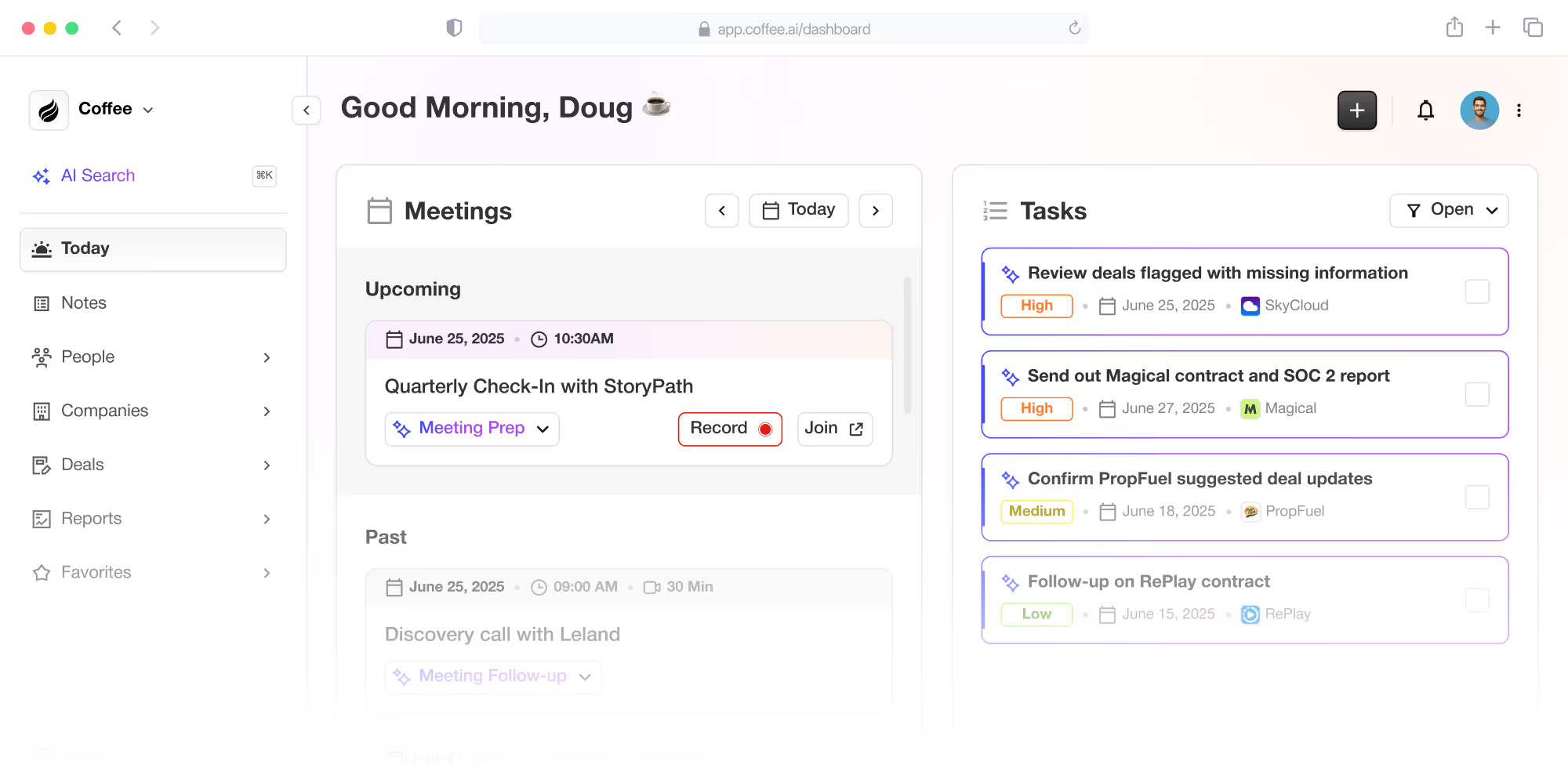
See how Coffee can improve your current CRM setup. Request access to learn more about its companion app benefits.
Day.ai: A Look at Its Autonomous CRM Model
Day.ai focuses on heavy automation, aiming to create a CRM that operates independently while still allowing user oversight. Day.ai automates across multiple areas, including people, pipelines, and pages. Its system handles data entry and enrichment on its own, with options for users to adjust or override as needed.
Comparing Coffee and Day.ai for Sales Leaders
Feature Breakdown: Coffee vs. Day.ai
|
Feature/Criterion |
Coffee |
Day.ai |
|
AI-Driven Automation (Data Entry) |
Automatic contact/company creation, activity logging from email/calendar |
Autonomous data entry with user override options |
|
AI-Driven Automation (Meeting Management) |
AI bot for briefings, summaries, follow-up drafts |
AI bot for summaries and next steps |
|
Data Unification & Enrichment |
Leverages both structured and unstructured data. Pulls real-time data from emails/calendars, built-in enrichment. |
Leverages only unstructured data |
|
Pipeline Intelligence |
“Pipeline Compare” for trend analysis over time |
Pipeline automation with user adjustments |
|
User Experience & Adoption |
Rep-focused design, acts as a co-pilot |
User control for trust, phased automation adoption |
|
Integration & Deployment Flexibility |
Standalone CRM or companion for Salesforce/HubSpot |
Standalone or integrations available |
Where Each Platform Stands Out
Automation Style
Coffee offers end-to-end automation across sales tasks, from contact creation to deal closure. It handles routine work while equipping reps with data for strategic focus.
Day.ai pursues near-complete autonomy with its self-driving model, introducing automation gradually and prioritizing user control to build comfort with AI reliance.
Pipeline Insights
Coffee’s “Pipeline Compare” delivers historical trend analysis, enabling proactive pipeline management by identifying patterns and health indicators over time.
Day.ai emphasizes automated pipeline handling with options for manual tweaks.
Deployment Approach
Coffee supports both standalone use for smaller firms and companion integration for Salesforce or HubSpot users, catering to a wide range of business needs.
User Trust and Engagement
Coffee boosts rep productivity with intuitive features and actionable insights, encouraging adoption through ease of use and immediate value.
Day.ai builds trust via control options and staggered automation, appealing to teams who prefer human input.
Which AI CRM Matches Your Team’s Needs?
Small Businesses Scaling Up
For startups or small businesses moving beyond spreadsheets or basic CRMs, Coffee’s standalone platform fits well. It addresses manual data entry and scattered information with automation and an easy-to-use interface, supporting growth without added workload.
A tech firm with significant revenue, for example, switched to Coffee after outgrowing spreadsheets. They valued its Google Workspace integration for contact creation, simple pipeline tracking, and API for custom needs, choosing it over Salesforce and HubSpot for usability.
Mid-Market Firms with Established CRMs
Mid-market companies using Salesforce or HubSpot often deal with low adoption and inconsistent data. Coffee’s companion app adds AI-driven automation and insights, unifying tools and improving user experience without scrapping current systems.
Teams Focused on Pipeline Strategy
Organizations prioritizing pipeline insights benefit from Coffee’s historical tracking and trend analysis. “Pipeline Compare” shifts reviews from basic updates to forward-looking strategy, ideal for complex sales cycles where early trend spotting drives results.
Discover Coffee’s pipeline management capabilities. Request access to see its impact on your sales growth.
Assessing Total Value and Ownership Costs
Ease of Setup and Adoption
Quick deployment matters in CRM selection. Coffee integrates with tools like Google Workspace and Microsoft 365, delivering value from day one by auto-creating records and enriching data without complex setup.
Adoption hinges on clear benefits for reps. Coffee cuts manual tasks and offers useful insights, encouraging natural uptake. Day.ai’s slower, controlled rollout may suit teams needing customization but could delay full benefits.
Scalability for Future Growth
A CRM must handle growth in data and team size. Coffee supports small to mid-sized firms with consistent performance, offering flexible deployment options as needs change over time.
Measuring Efficiency and Returns
ROI combines cost savings with revenue gains. Coffee frees reps from admin work, increasing selling time. It also aids deal progress and customer relationships through meeting tools and pipeline data, while consolidating tools to cut overhead.
How to Choose the Right AI CRM Partner
Identify Your CRM Challenges
Start by listing specific issues with your current system, like low adoption, bad data, or poor visibility. Use metrics such as time spent on updates and feedback from reps to pinpoint priority areas for improvement.
Set Clear Feature Priorities
Focus on automation that cuts the biggest time sinks, like data entry or meeting notes. Decide which insights, such as forecasting or real-time context, best support your strategy, and ensure integration matches your tech stack.
Weigh Deployment Options
Consider your existing investments and change readiness. Companion apps like Coffee’s fit firms with customized CRMs, while standalone options suit those starting fresh. Factor in timelines and resources for implementation.
Focus on User Buy-In
Adoption requires instant value and minimal disruption. Look at design ease, feature relevance, and team tech comfort. Assess training needs and support to ensure long-term engagement.
Ready to pick an AI CRM for your team? Request access to Coffee and test its automation for driving sales results.
Common Questions About AI CRMs
How Does Coffee Maintain Data Accuracy?
Coffee pulls real-time data from emails, calendars, and transcripts, avoiding flawed manual inputs. Connecting Google Workspace or Microsoft 365 auto-populates records, enhanced by partner-sourced details like job roles and company data for precision.
Does Coffee Work with Salesforce or HubSpot?
Yes, Coffee’s companion app syncs with Salesforce and HubSpot via simple authentication. It adds AI features while letting users decide which data updates the main CRM, maintaining system control.
How Does Coffee Save Reps Time Daily?
Coffee automates contact creation and activity tracking from email and calendar data. It handles meeting prep with summaries, transcribes calls, and drafts follow-ups, letting reps focus on clients over paperwork.
What Pipeline Features Set Coffee Apart?
Coffee’s “Pipeline Compare” offers historical data snapshots for trend tracking over custom periods. Leaders see deal progress, closures, and stalls instantly, making reviews strategic rather than routine.
How Does Coffee Ensure Data Security?
Coffee adheres to SOC 2 Type 2 and GDPR standards for data protection. It avoids using customer data for AI training and conducts regular security reviews to stay aligned with best practices.
Final Thoughts: Powering Sales with AI Innovation
Choosing between Coffee and Day.ai shapes how your sales team performs and grows revenue. As a leader in the AI CRM space, Coffee offers a compelling mix of automation, insights, and user focus, fitting seamlessly into diverse sales environments.
Its data capture and meeting tools reduce admin work, while pipeline analysis drives strategic planning. With options for standalone or companion use, Coffee meets varied organizational needs. By creating a tool that reps trust and value, it tackles adoption hurdles head-on, acting as a true partner in sales success.
Ready to elevate your sales operations? Request access to Coffee and experience an AI-driven CRM designed for results.