Written by: Doug Camplejohn, CEO & Co-Founder, Coffee
Key Takeaways for Modern Lead Scoring
- A lead scoring process assigns numeric values to prospects based on firmographic fit and behavioral engagement, then routes high-scoring leads to sales while directing low-scoring leads to nurture tracks.
- Stale or incomplete CRM data degrades scoring accuracy, breaks routing logic, and wastes sales time on unqualified prospects.
- Well-built lead scoring delivers measurable gains in lead generation ROI, sales productivity, and pipeline velocity by focusing outreach on the most promising leads.
- Before building a scoring model, teams need 200+ closed-won and closed-lost records, a documented ICP, CRM admin access, and aligned MQL and SQL definitions.
- Automate your data capture with Coffee to eliminate manual data entry and keep your lead scoring process accurate as your pipeline scales.
Why Lead Scoring Quality Matters in 2026
The cost of a broken scoring model is measurable. Sales reps waste up to 50% of their time on leads that are unlikely to convert. Manual data entry creates much of this waste. 71% of sales reps report spending too much time on data entry, leaving only 35% of their time for selling.
Fixing this creates clear upside. Companies that implement lead scoring see higher lead generation ROI and better sales productivity. Predictive lead scoring increases pipeline velocity by concentrating outreach on the most promising leads. When marketing and sales agree on what makes a qualified lead, handoff friction drops and follow-up becomes more consistent.
Let Coffee’s AI Agent handle your data entry so your scoring model stays accurate from day one.
Readiness Checklist Before You Build Your Model
Confirm these prerequisites before you invest time in a scoring model:
- Access to at least 200+ closed-won and closed-lost opportunity records in the CRM
- A documented Ideal Customer Profile (ICP) with measurable firmographic attributes
- CRM admin rights in Salesforce or HubSpot to configure scoring properties, workflows, and thresholds
- Formal RevOps and Sales alignment on MQL and SQL definitions
- Normalized lead sources, consistently tracked lifecycle stages, and logged closed-lost reasons
Step 1: Define Your ICP from Closed-Won Analysis
Owner: RevOps | Input: Closed-won and closed-lost CRM data | Output: Documented ICP with 8–10 measurable attributes
Export the customer list and segment by revenue, retention, expansion potential, and profitability. Identify the top 20% by lifetime value and document eight to ten specific, measurable characteristics. For example, technology companies with 100–500 employees, $10M–$50M annual revenue, VP+ decision makers, and 20%+ annual growth.

Focus on patterns that appear in at least 60% of the top-performing customer segment rather than all customers. Scoring criteria based on outliers create false positives at scale and confuse sales teams.
Common Mistake: Defining the ICP from marketing assumptions rather than closed-won data. Anchor ICP attributes to actual won deals, not target personas.
Step 2: Build Positive Scoring Criteria with Point Values and Examples
Owner: RevOps and Marketing Ops | Input: ICP attributes, behavioral data | Output: Weighted scoring rubric on a 100-point scale
Start with five to seven core criteria that predict roughly 80% of conversions, and balance firmographic factors with high-intent behaviors. The table below shows a practical scoring rubric that reflects this balance. Behavioral signals like demo requests carry the highest weight because they reveal active purchase intent.
| Criterion | Category | Points | Example |
|---|---|---|---|
| Demo request submitted | Behavioral | +50 | Form fill on /demo page |
| Free trial signup | Behavioral | +45 | Product-led signup event |
| Pricing page visit (3+ min) | Behavioral | +40 | Session duration tracked via CRM |
| Whitepaper download | Behavioral | +25 | Gated content form fill |
| Enterprise company size (1,000+ employees) | Firmographic | +30 | Enriched from data provider |
| C-level or VP+ decision maker | Firmographic | +30 | Job title field in CRM |
| Target industry match | Firmographic | +25 | Industry field matches ICP list |
| Blog subscription | Behavioral | +5 | Newsletter opt-in |
Step 3: Build Negative Scoring Criteria with a Full Table of Disqualifiers
Owner: RevOps and Sales Ops | Input: Disqualification signals from closed-lost analysis | Output: Negative scoring table integrated into the scoring model
Common Mistake: Skipping negative scoring entirely. A model without disqualifiers inflates scores for poor-fit prospects and sends them to sales, which erodes rep trust in the system.
| Disqualifier | Category | Deduction | Rationale |
|---|---|---|---|
| Competitor employee | Firmographic | -50 | No purchase intent |
| Fake or junk form data | Data quality | -30 | Invalid record |
| Student (unless targeting education) | Firmographic | -30 | No budget authority |
| Email unsubscribe | Behavioral | -25 | Explicit disengagement |
| Job seeker | Firmographic | -25 | No purchase authority |
| Personal email in B2B context | Data quality | -25 | Likely non-business intent |
| Wrong company size | Firmographic | -20 | Outside ICP band |
| Bounced email | Data quality | -20 | Unreachable contact |
| Single-page bounce | Behavioral | -10 | No meaningful engagement |
Step 4: Set Score Thresholds and Routing Rules
Owner: RevOps | Input: Scoring rubric, historical conversion data | Output: Threshold bands, routing workflow, and sample scorecard
Use a simple 100-point scale for thresholds. Treat 75+ as hot leads that need immediate attention, 50–74 as warm leads for active nurturing, 25–49 as cool leads for automated sequences, and below 25 as cold leads for basic marketing.
Routing workflow (text-based): Score calculated, threshold evaluated, 90+ triggers a phone call within 2 hours, 75–89 triggers email outreach within 24 hours, 60–74 enters personalized nurture, and below 60 remains in marketing automation only.
Set the initial MQL threshold conservatively to capture the top 20% of leads by score. Monitor MQL volume, MQL-to-SQL conversion, and SQL-to-closed conversion for 30 days, then adjust thresholds based on actual performance.
Common Mistake: Over-weighting firmographics creates a common failure mode. A prospect with perfect company size and title but zero behavioral engagement is not sales-ready, because firmographic fit only shows potential while behavioral signals show active intent. That is why behavioral signals must carry at least equal weight to firmographic fit in the final threshold calculation.
Step 5: Configure CRM Automation So Scores Update Automatically
Owner: CRM Admin and RevOps | Input: Scoring rubric, threshold bands | Output: Live automated scoring with real-time routing triggers
In HubSpot, configure score properties with inclusion and exclusion lists, set per-group point limits, and enable score decay at 1, 3, 6, or 12-month intervals so older events lose value automatically. Workflows can then trigger lead assignment for unworked contacts scoring over 50 or send Slack notifications when a deal score exceeds 75.
In Salesforce, configure Einstein Lead Scoring or custom formula fields to mirror the same threshold bands. Use Process Builder or Flow to trigger assignment rules and task creation at each band boundary.
Implement time-based score decay by reducing points 25% monthly without new activity. A 40-point lead decays to 30 after 30 days and 23 after 60 days, so inactive leads do not remain artificially high.
Step 6: Establish a Quarterly Audit Cadence
Owner: RevOps | Frequency: Every 90 days | Output: Updated weights, change log entry, recalibrated thresholds
Run quarterly recalibration cycles with clear performance metrics to evaluate and adjust scoring weights. Use a simple four-step audit process.
- Compare conversion rates for top-scored leads versus bottom-scored leads against the 3:1 benchmark established in your threshold configuration. If performance falls short, the model is not adding meaningful signal.
- Interview sales reps about false positives to understand why high-scoring leads did not close, then update point values based on conversion correlation analysis.
- Monitor KPIs including lead-to-opportunity conversion rate, opportunity-to-close rate by score tier, rep time-to-first-touch, and pipeline coverage by score band.
- Maintain a change log of scoring updates and results so you can track how the model evolves over time.
Step 7: Upgrade to AI-Agent Scoring That Uses Live GTM Data
Owner: RevOps and CRM Admin | Input: Email, calendar, call transcripts, enrichment data | Output: Continuously updated scores without manual entry
Rules-based scoring breaks down when CRM records are incomplete. AI scoring also struggles when lead records lack key predictive variables such as industry classification. The root cause stays the same in both cases: humans do not reliably enter data. Automation needs to capture information at the source instead of waiting for manual updates.
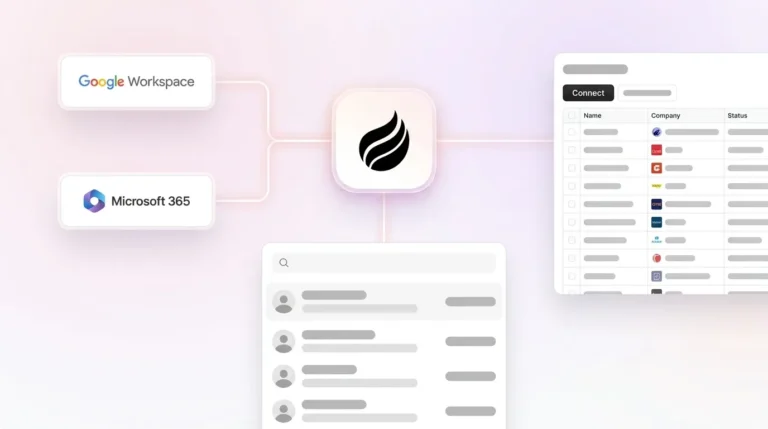
Coffee’s AI Agent solves this at the point of capture by intercepting data before it requires manual entry. After you connect Google Workspace or Microsoft 365, the Coffee Agent automatically creates and enriches contacts, logs every interaction, and writes call transcript summaries, structured by BANT, MEDDIC, or SPICED, directly back to Salesforce or HubSpot. Scores update continuously because the underlying data stays current.

Coffee supports two deployment models. The Companion App layers the Coffee Agent on top of an existing Salesforce or HubSpot instance and handles data entry so the system of record stays accurate without human effort. The Standalone CRM replaces legacy systems entirely for teams of 1–20 that want an agent-first architecture from the start.
Companies that implement AI-assisted predictive lead scoring see more opportunities from marketing-sourced leads and shorter sales cycles for flagged leads.
Use Coffee to keep your lead scores accurate without adding headcount.
Validate Your Lead Scoring Process with Simple Checks
Validation confirms that the model drives real outcomes instead of just creating activity. Run these checks 30 days after launch and during each quarterly audit to complement your formal model review.
- Data completeness: Enforce mandatory fields and run regular data-quality audits before you rely on predictive scoring models.
- Conversion ratio: Verify that top-scored leads are meeting the 3:1 conversion benchmark defined in your threshold configuration.
- Speed-to-contact: Contacting leads within 5 minutes of engagement boosts conversion rates by 700% (8x) compared to waiting longer than 5 minutes.
- Model accuracy: Test the model on past leads and compare predicted scores against actual outcomes to identify false positives and false negatives.
- Parallel testing: Deploy a new lead score in parallel with the existing model for 30 days and measure which one better predicts actual outcomes before you shift routing decisions.
Scaling Guidance for Small Teams and Mid-Market CRMs
Small teams (1–20 reps): Start with five criteria maximum, two firmographic and three behavioral. Use Coffee’s Standalone CRM so the Agent handles all data entry from day one. Skip complex decay configurations at first and add them at the 90-day audit once you have conversion data.

Mid-market teams on Salesforce or HubSpot: Deploy Coffee as a Companion App to fix data quality without migrating the system of record. For sales cycles of 30–90 days, refresh scores daily. Run structured A/B tests on scoring variants before you roll out model changes to the full pipeline. Schedule quarterly reviews with Sales, Marketing, and RevOps stakeholders to validate accuracy, recalibrate thresholds, and reinforce cross-team trust.
Frequently Asked Questions
Who owns the lead scoring process?
RevOps or Sales Ops owns the scoring model architecture, threshold configuration, and quarterly audit cadence. Marketing Ops owns the behavioral criteria tied to campaign and content engagement. Sales leadership provides input on false positives and false negatives from direct rep feedback. Without a single accountable owner, typically the Head of RevOps or Sales Ops, scoring models drift because no one owns recalibration when conversion rates shift.
How often should we update scoring criteria?
A quarterly audit cadence works for most B2B teams with 30–90 day sales cycles. At each audit, compare top-scored lead conversion rates against bottom-scored rates, interview reps about leads that did not close, and update point values based on what the data shows. Update criteria immediately, outside the quarterly cycle, whenever a major ICP shift occurs, a new product line launches, or a channel mix change alters the behavioral signals entering the model. Maintain a change log so every adjustment stays traceable.
What integration effort is required with Salesforce or HubSpot?
For native scoring tools in HubSpot, configuration requires CRM admin access to set up score properties, threshold bands, decay intervals, and workflow triggers. A single admin can usually complete this in one to two weeks. Salesforce requires similar admin effort to configure Einstein Lead Scoring or custom formula fields plus Flow automation. Coffee’s Companion App connects to either platform through a simple authentication step, after which the Coffee Agent begins syncing, enriching, and writing data back to the CRM automatically, with no custom development required. Deeper integrations beyond Google Workspace and Microsoft 365 are available via Zapier, with additional native integrations on the roadmap.
How does the process evolve as the sales team grows?
At 1–5 reps, a simple rules-based model with five criteria and manual threshold reviews is sufficient. At 10–20 reps, add behavioral decay, negative scoring, and automated routing workflows. At 20+ reps, introduce predictive scoring that trains on closed-won and closed-lost data, segment scoring by product line or geography, and implement daily score refresh cycles. At every stage, data quality remains the main constraint. As headcount grows, manual CRM entry becomes less reliable, so teams at the 20+ rep level benefit most from an AI agent that handles data input continuously instead of relying on rep discipline.
Conclusion: Turn Accurate Scoring into Faster Pipeline
A lead scoring process built on these seven steps, ICP definition, positive criteria, negative criteria, threshold routing, CRM automation, quarterly audits, and AI-agent data capture, gives RevOps teams a repeatable system for routing the right leads to sales without adding headcount. Clean CRM data forms the foundation. Without it, every scoring model degrades within weeks of launch.
Coffee’s AI Agent removes the manual entry burden that causes that degradation. Whether you deploy it as a Companion App on Salesforce or HubSpot or as a Standalone CRM, the Coffee Agent captures interactions from email, calendar, and calls, enriches records automatically, and keeps scores current so pipeline reviews reflect reality instead of stale data.