Written by: Doug Camplejohn, CEO & Co-Founder, Coffee
Key Takeaways for Claude–CRM Integrations
- Connecting Claude to your CRM gives you conversational access to live pipeline data and removes the need for manual exports or dashboard toggling.
- AI-powered CRM integrations can recover up to 5 hours per rep per week while improving data completeness and forecast accuracy.
- Four integration paths exist, from native connectors and MCP servers to custom APIs and fully autonomous agents, each with different complexity and maintenance needs.
- Traditional connectors solve the query problem but still rely on human data entry, while an autonomous agent removes the data-entry burden entirely.
- Deploy an autonomous agent that automatically captures, enriches, and maintains CRM data without manual effort.
Prerequisites Checklist for Any Claude–CRM Path
These prerequisites build on each other so your integration stays secure, reliable, and easy to manage.
- Confirm admin-level access to your CRM, such as Super Admin for HubSpot or System Administrator for Salesforce, so you can approve scopes and install apps.
- Connect Google Workspace or Microsoft 365 to your CRM so emails and calendars sync cleanly into contact and activity records.
- Activate a paid Anthropic subscription (Pro, Max, Team, or Enterprise), because free plans do not support connectors or MCP-based tools.
- Assign a clear integration owner, usually a Head of Sales or RevOps lead, who will manage permissions, monitor tokens, and validate outputs.
- Document required fields and permission scopes before any OAuth flow so you can approve only what Claude needs and avoid rework later.
Skip the prerequisites entirely and let the Coffee agent handle setup.
Path 1: HubSpot Native Connector Setup Checklist
HubSpot provides an official native Claude connector, last updated November 20, 2025. It lets users with a paid Anthropic subscription get personalized AI insights from HubSpot records, visualize data in charts, create or update CRM records, and log activities, tasks, and notes directly from the Claude chat window.
- Navigate to connector settings. In Claude, go to Settings → Connectors → Browse Connectors, select HubSpot on the Web tab, and click Add to Team.
- Authenticate. Click Connect, select the target HubSpot account, and approve the requested OAuth permission scopes. Only a Super Admin or user with App Marketplace permissions can complete this step.
- Grant team-wide access. In HubSpot under Settings → Integrations → Connected Apps, select the connector and use Give Users Access. This grants permanent access to all current team members, and you cannot revoke it selectively later, so verify your team roster before proceeding.
- Verify permission scopes. The connector supports read, create, and update actions on Contacts, Companies, Deals, Tickets, Line Items, Products, Campaigns, and Engagements. It does not support delete operations. Confirm each scope matches your team’s minimum required access.
- Test with a live query. Ask Claude to retrieve the five most recently modified deals. Confirm records match what appears in HubSpot. If results are empty, check that the authenticated user has CRM object permissions in HubSpot.
Known limits and pitfalls: HubSpot’s standard bulk update limit is 10 records but is easily bypassed via the Claude connector, which is subject to the platform’s API limits of 100 records per batch request. OAuth tokens can expire silently, so schedule a monthly check to re-authenticate if queries return authorization errors. HubSpot’s migration from v1 to v3 API endpoints has historically broken connectors mid-cycle. Common maintenance tasks for native CRM integrations include handling OAuth token refresh failures, vendor API deprecations, rate limit changes, and new required scopes.
Path 2: MCP Server Setup for Salesforce, Zoho, and Close
Salesforce Hosted MCP Servers became generally available before May 26, 2026. They allow agents like Claude to run SOQL queries, modify records, and execute actions directly without logging into Lightning Experience or using Agentforce. Zoho and Close use third-party MCP servers that follow the same OAuth 2.1 architecture.
The three-step setup for Salesforce follows a predictable pattern.
- Activate Hosted MCP Servers in your Salesforce org and identify which standard servers, such as Platform, Data Cloud, Tableau, or MuleSoft, your team requires.
- Create an External Client App. Name it “Claude MCP Client.” Required OAuth settings include the mcp_api scope, refresh_token or offline_access scope, PKCE extension, JWT-based access tokens, and no secret requirement for Web Server or Refresh Token flows. Set the OAuth callback URL to https://claude.ai/api/mcp/auth_callback.
- Connect Claude. Add the MCP server URL to Claude Desktop or Claude Code using the transport HTTP flag and your External Client App consumer key.
Permission scoping and guardrails: Least-privilege guardrails for MCP tools require separate credentials per identity, exposure of only required tools, distinction between read, create, update, and delete operations, restriction to specific resources or tenants, time-bound access, and exclusion of sensitive fields. For a read-only Claude integration, expose only resource primitives and suppress all write tools. Use allow-lists rather than deny-lists so that any new tools added to a server are denied by default to existing agents, preventing silent inheritance of additional capabilities.
Token expiry: Assign one RevOps owner responsible for monitoring token health. MCP servers should re-check authorization on each request rather than caching decisions at connection time, because tool descriptions can change mid-session and session-cached approvals will not catch the change.
Path 3: Custom API Integration with Zapier Fallback
Teams without a native connector or hosted MCP server can use a direct API integration with a Zapier fallback for coverage. This path delivers flexibility but demands the most ongoing maintenance.
A minimal Python example for a HubSpot REST call:
import requests headers = {"Authorization": "Bearer YOUR_ACCESS_TOKEN"} response = requests.get( "https://api.hubapi.com/crm/v3/objects/deals", headers=headers, params={"limit": 10, "properties": "dealname,amount,closedate"} ) print(response.json())Use this field-mapping checklist before going live so your integration behaves predictably.
- Map every source field to its CRM destination field and document the data type, such as string, date, or currency, so type mismatches do not cause silent failures.
- Once mapping is complete, define which source is authoritative for each field so your integration does not overwrite high-quality first-party data with lower-confidence enrichment.
- Set rate-limit buffers, because HubSpot enforces 100 requests per 10 seconds on most endpoints and Salesforce API limits vary by edition.
- Build idempotent handlers so duplicate webhook events do not create duplicate records or inflate activity counts.
- Log every field update with source, timestamp, and confidence score so audits and debugging sessions have a clear trail.
Maintenance burden: Native CRM integrations require significant initial and ongoing investment. Zapier middleware adds a dependency layer that can make complex conditional workflows fragile over time. This path suits teams with dedicated engineering resources and a tolerance for continuous upkeep.
Path 4: Deploying the Coffee Agent for Autonomous Data Entry
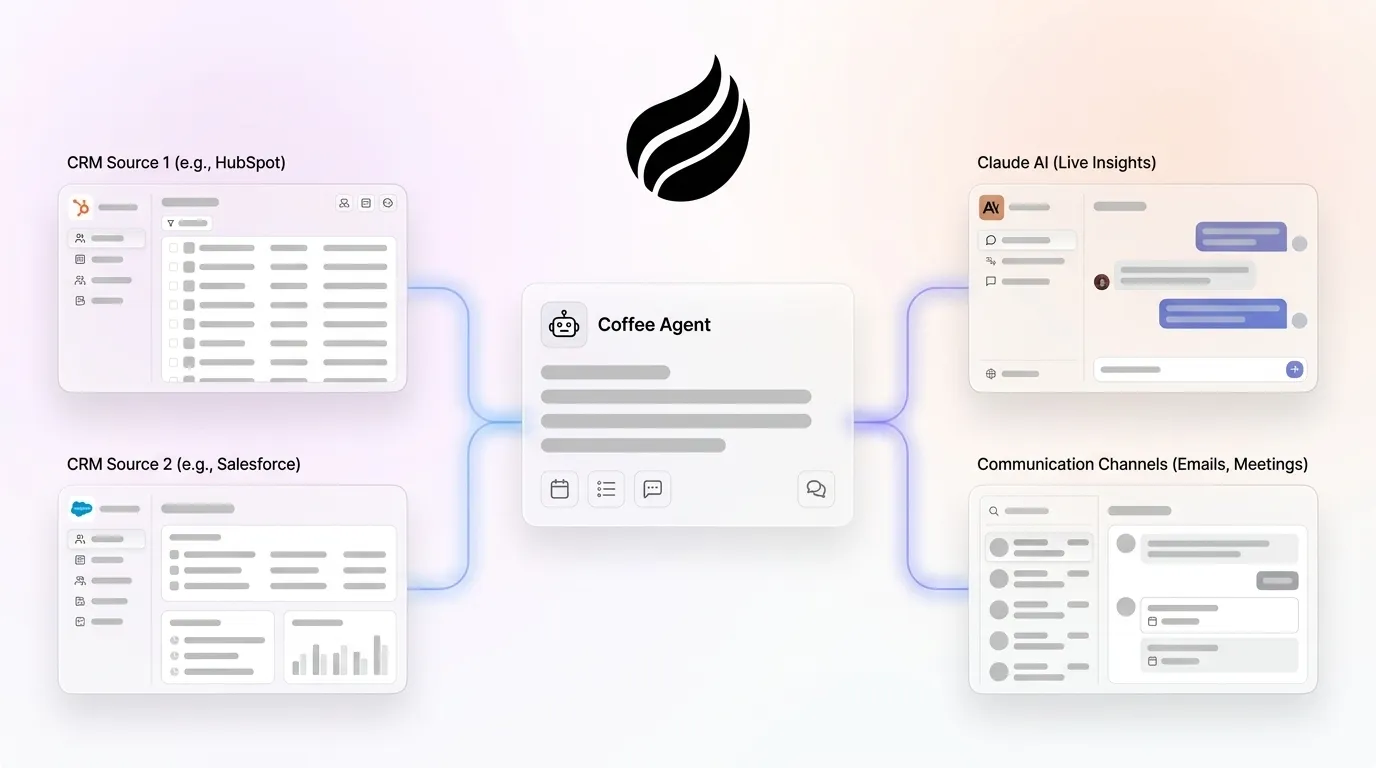
Coffee removes the data-entry burden that keeps Paths 1 through 3 from being complete solutions. Those paths let Claude query CRM data, yet they still rely on humans to put accurate data into the CRM in the first place. Coffee’s agent handles that layer automatically.
Coffee operates in two deployment models tailored to different stages of CRM maturity.
- Companion App: Deploys the Coffee Agent as an intelligent layer on top of an existing Salesforce or HubSpot instance. A simple authentication lets the agent sync data, enrich it, and write insights back to the primary CRM. This model fits teams of 5 to 25 that remain committed to their existing system of record.
- Standalone AI-First CRM: The Coffee Agent powers the entire platform. This model fits companies that have outgrown spreadsheets but view legacy CRMs as expensive maintenance burdens.
Once connected to Google Workspace or Microsoft 365, the agent immediately begins a set of always-on workflows.

- Automatic contact and company creation: The agent scans emails and calendars to populate the CRM with people and organizations, associating every interaction with the correct record.
- Activity logging: Last activity and next activity are logged autonomously, which keeps deal state current without rep input.
- Meeting briefings and follow-ups: The agent prepares reps with attendee context before calls and drafts summaries, next steps, and follow-up emails immediately after. Custom Meeting Briefings and Summaries, launched in February 2026, allow teams to define exact formats such as high-level executive summaries or granular technical breakdowns. Improved summary templates released in November 2025 are customizable to match workflows and writable back to Coffee, HubSpot, or Salesforce.
- Pipeline Compare: The agent visualizes week-over-week pipeline changes, highlighting progressed deals, stalled opportunities, and new additions, which replaces manual CSV exports and pipeline interrogation sessions.
- AI search on deals: Coffee’s AI search on deals, released in January 2026, answers natural-language questions such as “Which deals are stuck in negotiation?” or “What’s closing this month?” This matches the live-query capability that Claude connectors provide, backed by agent-maintained data quality.
Because the agent captures history in a built-in data warehouse, AI-captured CRM data can reach high accuracy for field population and activity logging. Many teams see better forecast accuracy than with manual entry, which passive connectors cannot guarantee.

Deploy the Coffee agent on your existing Salesforce or HubSpot instance today.
Validation Checklist Before Team-Wide Rollout
Run this validation checklist after deploying any integration path so you catch issues before a full rollout.
- Query a live opportunity by name and confirm the returned stage, amount, and close date match the CRM record exactly.
- Send a test email to a contact in the CRM and verify the activity appears as a logged engagement within five minutes.
- Run Pipeline Compare against last week’s manual pipeline export and confirm week-over-week deal movement is accurate.
- Attempt a write operation by creating a test contact and verify it appears in the CRM with all required fields populated.
- Confirm that users without CRM access to a specific record cannot retrieve it through the Claude interface.
- Check that OAuth tokens are valid and document the expiry date on the integration owner’s calendar.
How the Workflow Scales Across Team Sizes
Integration needs change as teams grow, and the impact of each path becomes more pronounced at larger headcounts. The table below shows how time savings and data accuracy improve as you move from passive query tools to autonomous agents, which explains why larger teams see the strongest ROI from agent-based approaches. Data points come from cited research, and maintenance figures reflect industry benchmarks rather than guaranteed results for any specific deployment.
For advanced use cases, Coffee’s List Builder accepts natural-language commands directly inside Claude prompts. A RevOps leader can instruct the agent, “Find me VPs of Sales in North America at companies with $10M+ funding using Salesforce,” and the agent executes the outbound workflow using integrated enrichment data without leaving the conversational interface.

Frequently Asked Questions
How long does it take to set up each integration path?
The HubSpot native connector typically takes under 30 minutes for an admin with the correct permissions. The Salesforce MCP Server setup requires creating an External Client App and configuring OAuth settings, which takes one to three hours depending on familiarity with Salesforce’s developer console. A custom API plus Zapier integration requires two to four hours of upfront development work for standard field mapping, with additional time for complex conditional workflows. Coffee’s Companion App deploys via a single authentication step connecting to Google Workspace or Microsoft 365, after which the agent begins populating the CRM automatically, so most teams are operational within the same business day.
Is Coffee secure and compliant with data privacy regulations?
Coffee is SOC 2 Type 2 and GDPR compliant. Customer data is never used to train public AI models. For teams operating under GDPR Article 25’s Privacy by Design requirements or preparing for California’s DELETE Act enforcement beginning August 2026, Coffee’s architecture keeps data within defined compliance boundaries. Every automated change made by the agent is logged with source, timestamp, and context, which provides the audit trail that enterprise security reviews require.
How does Coffee’s pricing work, and is agent usage metered separately?
Coffee uses seat-based pricing. Teams pay for human seats, and the agent’s labor, including unlimited data entry, enrichment, activity logging, meeting briefings, and Pipeline Compare, is included at no additional cost. There is no complex metering on LLM usage or individual process executions. This model keeps cost predictable as the team scales, unlike API-based integrations where usage fees can compound with volume.
Can Coffee migrate data if we switch from HubSpot to Salesforce?
Coffee’s Companion App is designed to work on top of either Salesforce or HubSpot, and the agent’s data warehouse retains the full interaction history regardless of which system of record is active. Teams migrating between CRMs can use Coffee as the continuity layer. The agent continues logging activities and enriching records during the transition, which prevents the data loss that typically accompanies a CRM migration. The specific migration path depends on the team’s existing data structure, and Coffee’s team works with RevOps leads to map fields and validate record integrity before cutover.
What happens to CRM data quality if reps do not adopt the integration?
With Paths 1 through 3, adoption remains necessary, because reps must use Claude to query data and the underlying CRM records are only as accurate as human entry allows. B2B contact data decays at approximately 22.5% per year on average, so a 20,000-contact database will contain roughly 4,500 stale records after 12 months without active maintenance. Coffee’s agent removes the adoption dependency entirely. Because the agent captures data from emails, calendars, and call transcripts automatically, CRM records stay current even when reps never open the CRM interface directly.
Conclusion: Why an Autonomous Agent Changes the Equation
The three connector-based paths we explored all share the same fundamental limitation, because they assume humans will maintain data quality. In traditional CRM systems with added AI features, data quality is only as current as the last time a human rep updated records, because the core design assumes humans create, update, and log all activity.
An autonomous agent is the only architecture that removes that assumption. When the agent handles data entry, enrichment, activity logging, and hygiene continuously, the output, including forecasts, pipeline reviews, and deal briefings, reflects reality rather than whatever a rep remembered to type last Tuesday. Recovering several hours per rep per week from data entry can redirect substantial time to revenue-generating work.
Connect the Coffee agent to your existing CRM or deploy the Standalone platform and let the agent build your system of record from day one.