Written by: Doug Camplejohn, CEO & Co-Founder, Coffee | Last updated: August 7, 2026
Key Takeaways for Deal Scoring Thresholds
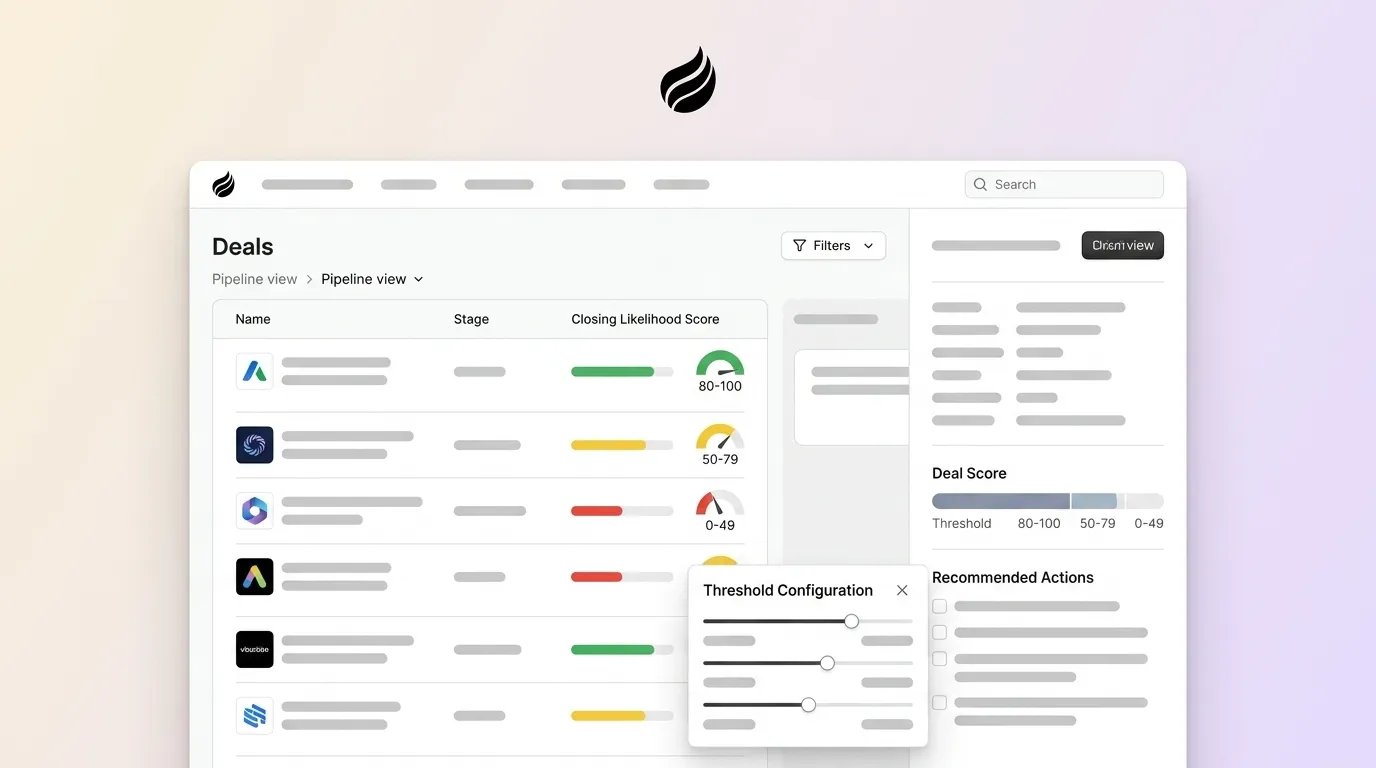
- Deal scoring thresholds convert a 0–100 composite score into clear action bands, such as pursue, nurture, escalate, or disqualify, based on historically observed win probability.
- Calibrated thresholds derived from a company’s own closed-won and closed-lost data consistently outperform static industry ranges and improve forecast accuracy.
- A 100-point weighted model maps qualification evidence, buying signals, and MEDDIC/MEDDPICC fit to explicit point allocations that enforce stage gates and improve close rates.
- Three-step calibration that pulls 12-month data, calculates win rates per band, and adjusts until the top band exceeds target creates statistically defensible cutoffs that teams can automate in HubSpot or Salesforce.
- Coffee’s autonomous agent eliminates manual data-entry gaps so scoring thresholds remain accurate; get started with Coffee today.
Comparing Industry Ranges to Calibrated Thresholds
Calibrated thresholds grounded in your own closed-won and closed-lost data outperform generic industry ranges. Teams that recalibrate scoring models on a regular cadence see better conversion prediction accuracy than teams that rely on static, uncalibrated models.
The table below maps each score band to its typical industry label, a concrete win-rate target, and the recommended action. These calibrated win-rate targets replace vague labels with measurable expectations.
| Score Band | Industry Standard Label | Calibrated Win-Rate Target | Recommended Action |
|---|---|---|---|
| 80–100 | Sales-Ready / Tier A | ≥60% win rate | Immediate rep outreach, forecast commit |
| 50–79 | Warm / Tier B | 40–59% win rate | Automated sequence and SDR call within 24 hours |
| 25–49 | Nurture / Tier C | 20–39% win rate | Marketing nurture and monitor for score lift |
| 0–24 | Disqualify / Tier D | <20% win rate | Recycle or drop, no rep time allocated |
If a high proportion of scored deals fall into the top band, thresholds are likely too generous and need tightening. The calibration steps in the next sections correct this pattern.
Score Weights and Stage Gates Across the Deal Cycle
A 100-point weighted model maps qualification evidence, buying signals, and MEDDIC/MEDDPICC fit to explicit point allocations. The weights below come from analyzing which attributes appear in 70% or more of closed-won deals and assigning proportionally higher values to those signals, while reducing or removing attributes that appear in fewer than 20% of wins.
The table shows how each scoring dimension contributes to the total score and which stage gates it supports.
| Scoring Dimension | Max Points | Full-Credit Condition | Stage Gate Relevance |
|---|---|---|---|
| Economic Buyer identified and met | 20 | EB on record, attended at least one call | Discovery → Solution |
| Pain quantified with business impact | 20 | Dollar or time cost documented in CRM | Qualification → Discovery |
| Decision process and criteria documented | 15 | Evaluation criteria and approvers named | Solution → Proposal |
| Champion strength | 15 | Champion has presented internally on your behalf | All stages |
| Compelling event with named date | 15 | Contract expiry, board deadline, or operational trigger logged | Proposal → Negotiation |
| Budget confirmed and sized | 10 | Budget range discussed, purchase process known | Discovery → Proposal |
| Mutual action plan with next dated step | 5 | Agreed next meeting or deliverable on calendar | All stages |
Deals that complete technical validation early tend to close at higher rates than deals that skip or delay technical validation. Enforce the Economic Buyer dimension as a hard stage gate and block advancement until engagement occurs, since operators often see win rates rise after enforcing economic buyer engagement.
Get started with Coffee, and automate deal scoring thresholds across your pipeline today.
Step-by-Step Calibration of Deal Score Thresholds
Three clear steps convert raw historical data into statistically defensible cutoffs.
Step 1 — Pull 12-month closed-won and closed-lost data. Export every deal closed in the last 12 months from your CRM. A list of the last 30–50 closed-won deals (or a cohort of ≥20 closed-won accounts) is recommended to build and validate a scoring model. Score each deal retroactively using the 100-point model above, and record the score each deal would have received at the 30-day mark.
Step 2 — Calculate win probability at each score band. Segment deals into the four bands from the comparison table. For each band, apply the formula: Win Rate = Closed Won ÷ (Closed Won + Closed Lost). This stage win-rate formula is the standard method for deriving probability weights used in forecasts. A healthy result shows that leads with higher scores close at higher rates. If your bands do not show this pattern, or if too many low-quality deals receive high scores, the next step tightens the thresholds.
Step 3 — Adjust until the top band exceeds a high close rate. The validation target is for most historical closed-won deals to score above the SQL threshold while a smaller share of closed-lost deals exceed that same threshold. If the top band falls below target, raise the threshold by 5 points and retest. This adjustment process improves lead quality and sharpens focus on high-probability deals. Pilot the new thresholds on one sales region or 20% of deal volume for 2–4 weeks before full rollout.
Implementing Thresholds in HubSpot Workflows
HubSpot Professional and above supports both manual and predictive deal scoring natively. The following steps configure a threshold-driven workflow that aligns score bands with sales actions.
- Create a custom Deal property. Navigate to Settings → Properties → Deal Properties and create a Number property named Deal Score.
- Build scoring rules. In HubSpot’s Score property editor, or via Workflows for manual calculation, map each of the seven model dimensions to point values. HubSpot Professional supports manual scoring with up to 100 criteria.
- Configure threshold workflows. Create a Deal-based Workflow triggered when Deal Score is known. Add branching logic that matches each score band to the appropriate sales response. High-confidence deals with a score of 75 or higher warrant immediate attention, so send a Slack notification to channel #pipeline-escalations and set Forecast Category to Commit. Moderate-confidence deals with scores between 60 and 74 need structured follow-up rather than urgency, so set Forecast Category to Best Case and create a follow-up task. Low-scoring deals below 40 signal a qualification gap, so enroll them in a coaching sequence and notify the rep’s manager for intervention.
- Map to pipeline stages. Use HubSpot’s Deal Stage automation to require a minimum Deal Score before a deal can advance. Set the stage gate at 40 points for Qualified and 60 points for Proposal.
- Set stale-deal alerts. Add a time-based branch. If no activity is logged for 14 days, create a high-priority re-engagement task, send a Slack alert to the rep and manager, and add an At Risk flag to the deal record.
HubSpot reports that customers see 94% more deals closed after 6 months based on 2025 data. Data quality remains the main limitation, because HubSpot’s scoring rules only perform well when reps keep fields current.
Implementing Thresholds in Salesforce Flows
Salesforce supports threshold-driven scoring through Einstein Lead Scoring and Flow Builder. The steps below align score thresholds with routing, tasks, and stage gates.
- Create a custom Opportunity field. Add a Number field named Deal_Score__c to the Opportunity object via Setup → Object Manager.
- Configure Einstein or manual scoring rules. Salesforce Flow uses Einstein Lead Scoring for AI-driven predictions and Flow Builder to route leads based on custom score thresholds and criteria. For manual models, use a Flow that reads field values and writes a calculated score to Deal_Score__c on record save.
- Build threshold-based Flows. Create a Record-Triggered Flow on Opportunity update. Decision elements branch on Deal_Score__c. Scores of 75 or higher create a high-priority Task, post to Slack via an outbound HTTP call, and update Forecast Category to Commit. Scores between 60 and 74 update Forecast Category to Best Case. Scores below 40 create a coaching Task assigned to the rep’s manager.
- Enforce stage gates. Use Validation Rules to block stage advancement if Deal_Score__c is below the required threshold for that stage, such as 40 for Needs Analysis and 60 for Proposal or Price Quote.
- Automate stale-deal detection. Schedule a Flow to run nightly. If Last Activity Date is more than 14 days ago and the Opportunity is open, flag the record and notify the rep and manager.
As with HubSpot, Salesforce scoring accuracy degrades when reps skip field updates. Weighted pipeline values in CRM automation update automatically as deals progress through stages, enabling real-time revenue forecasting without manual calculation, but this only holds when the underlying data stays current.
AI Deal Scoring with Coffee’s Agent
Agent-Driven Calibration with Coffee
Both HubSpot and Salesforce scoring configurations share a core flaw because they depend on reps to populate the fields that feed the model. When fields are blank or stale, scores are wrong, thresholds fire on bad data, and forecasts mislead. Coffee addresses this at the source by capturing data automatically.
Coffee captures structured and unstructured data such as emails, calendar events, call transcripts, and meeting notes, then writes it back to the CRM record automatically without rep intervention. The agent structures notes according to MEDDIC or BANT frameworks, which ensures that every dimension of the 100-point model has a populated, ground-truth value. Because the agent handles data entry, the scoring model operates on complete records rather than partially filled forms.
For teams running HubSpot or Salesforce, Coffee deploys as a Companion App. A simple authentication allows the agent to sync, enrich, and write insights back to the primary CRM. For teams ready to replace their CRM entirely, Coffee’s Standalone platform runs the agent as the system of record.
Automated Actions at Defined Thresholds
Clean, complete data allows Coffee to trigger precise automated actions at calibrated score bands.
- Score ≥ 75: Real-time Slack escalation to the rep and sales manager with deal context, Economic Buyer status, and next step. Forecast Category set to Commit.
- Score 60–74: Forecast Category set to Best Case. Automated follow-up task created with a 24-hour deadline. Rep briefing generated from call transcripts and email history.
- Score below 40: Coaching task created and assigned to the manager. Deal flagged for pipeline review. If no activity occurs in 14 days, escalation fires regardless of score.
Stage-based deal scoring can produce lower forecast accuracy than signal-based scoring in enterprise sales pipelines. Coffee’s agent captures behavioral signals such as meeting frequency, email response rates, and Economic Buyer engagement that stage-based models miss entirely.
Contacts above the scoring threshold tend to convert to pipeline at higher rates, close faster, and carry lower customer acquisition costs. Those gains require accurate scores, which depend on accurate data, and Coffee’s agent delivers that foundation.
Recalibration Triggers and Monitoring Checklist
A scoring model calibrated today will drift as market conditions, product lines, and buyer behavior evolve. The triggers below signal that you need an unscheduled recalibration outside the standard quarterly cycle, and together they cover performance, product, market, and team changes.
- Win-rate drift: A drop of more than 15% in MQL-to-SQL conversion rate or more than 10% in average deal size triggers immediate recalibration.
- New product launch: New SKUs change the buyer profile and qualification criteria, so recalibrate within 30 days of launch using whatever closed data is available.
- Market or competitive shift: Base-rate shifts across segments, such as different win rates by region, product line, or quarter, break fixed thresholds and require segment-level recalibration.
- Quarterly standard review: Recalibrate every 60–90 days or whenever 15 or more new deals close, by adding the most recent quarter’s closed-won data to the training set and re-running pattern extraction.
- Rep or territory changes: New reps or realigned territories alter the distribution of deal attributes, so rescore the pipeline within two weeks of any significant team restructure.
Monitor these core metrics to detect drift early: MQL-to-SQL conversion rate, average deal size by initial score band, and time-to-close by score tier. Coffee’s Pipeline Compare feature surfaces week-over-week changes in these metrics automatically, without manual CSV exports.
Frequently Asked Questions
Is Coffee secure enough to handle sensitive deal and pipeline data?
Coffee is SOC 2 Type 2 certified and GDPR compliant. Data processed by the Coffee agent is not used to train public AI models. For most small-to-mid-market B2B companies, this security posture satisfies standard procurement requirements. Organizations in heavily regulated industries such as healthcare or finance that require multi-year security reviews fall outside Coffee’s current target profile, and Coffee is transparent about that boundary. For the RevOps and sales leaders Coffee is designed to serve, the compliance framework is sufficient for connecting Google Workspace or Microsoft 365, syncing with HubSpot or Salesforce, and processing call transcripts and email data through the agent.
How much integration effort is required to deploy Coffee alongside an existing HubSpot or Salesforce instance?
Coffee’s Companion App model is designed for minimal setup friction. A simple OAuth authentication connects the Coffee agent to an existing Salesforce or HubSpot instance. Once connected, the agent begins syncing data, enriching records, and writing insights back to the primary CRM without requiring custom development or a dedicated IT project. Coffee has deep knowledge of HubSpot and Salesforce architectures, including quotas, forecasting fields, required fields, and validation rules, which distinguishes it from newer CRM alternatives that lack the integration sophistication to serve established mid-market teams. For teams that need connections to tools outside the native integration set, Coffee currently supports additional connections via Zapier, with deeper integrations on the product roadmap.
How does Coffee’s pricing model work for deal scoring and pipeline intelligence features?
Coffee uses seat-based pricing. Each human user on the team occupies one seat, and the agent’s labor, including data capture, enrichment, scoring support, meeting summaries, pipeline tracking, and automated actions, is included without additional metering on AI usage or process volume. There are no separate charges for the number of deals scored, the number of automations triggered, or the volume of data the agent processes. This model stays intentionally simple, so teams pay for the people and the agent works without limits. Pricing details and plan tiers are available at coffee.ai/pricing.
What data volume is needed before deal scoring thresholds produce reliable results?
As noted in the calibration steps, you need 30–50 closed deals before thresholds become statistically reliable. With fewer closed deals, scoring rules can tend to overfit to outliers and generate noisy thresholds. For teams that are early in their sales history, the practical path is to start with the industry-standard bands from the comparison table above, run the model for one quarter, then recalibrate once enough closed data has accumulated. Coffee’s agent accelerates this process by ensuring every deal’s qualification data is captured completely from day one, so the historical dataset used for calibration is clean and complete rather than riddled with blank fields.
Conclusion: Turning Deal Scores into Reliable Forecasts
Guesswork thresholds produce inaccurate forecasts, misrouted deals, and wasted coaching time. A calibrated 100-point model built on historical win rates, validated against closed-won cohorts, and enforced through automated CRM workflows replaces subjective cutoffs with defensible, action-oriented bands. Some operators have improved forecast accuracy by enforcing a deal quality rubric and stopping advancement of deals below the minimum threshold.
The model works when the data feeding it is accurate. As shown in the AI examples above, Coffee’s agent solves the data quality problem by removing manual entry from the workflow entirely, capturing every interaction, structuring every qualification signal, and writing clean records back to HubSpot, Salesforce, or Coffee’s own platform.