
Written by: Doug Camplejohn, CEO & Co-Founder, Coffee
Key Takeaways for CRM Leaders
- AI automated data entry tools capture contacts, activities, and notes from email, calendar, and calls, then write structured records directly into CRMs like Salesforce and HubSpot.
- Eight criteria define effective 2026 tools: native integrations, hours saved, multi-channel capture, duplicate prevention, pipeline intelligence, deployment model, pricing, and security or compliance.
- Companion agents layer onto existing CRMs while standalone platforms serve as the system of record. Coffee supports both models for different team sizes and tech stacks.
- AI agents save reps 8–12 hours per week, reach 95% or higher data accuracy, and deliver measurable first-year ROI through automated enrichment and post-call summaries.
- Teams ready to eliminate manual CRM data entry can start automating CRM data entry with Coffee today.
Eight Criteria for Evaluating 2026 AI Data Entry Tools
These eight criteria separate reliable AI tools from expensive experiments in 2026.
- Native CRM integrations, with direct API connectivity to Salesforce, HubSpot, or both, without middleware friction.
- Hours saved per rep per week, based on quantified reductions in manual entry time, not vague estimates.
- Handling of calls, emails, and meetings, including transcription accuracy, summary quality, and automatic field population across all three channels.
- Duplicate prevention, with automated matching and merging logic that has measurable precision and recall.
- Pipeline intelligence output, such as week-over-week deal tracking, forecast accuracy, and stall detection without manual CSV exports.
- Companion vs. standalone deployment, describing whether the tool layers onto an existing CRM or replaces it entirely.
- Pricing model, whether seat-based, usage-based, or module-tiered, and what each level includes.
- Security and compliance, including SOC 2 Type 2 certification, GDPR alignment, role-based access controls, and data residency options.
See how Coffee meets these eight criteria for your team
Hours Saved per Rep per Week and Why It Matters
Time savings is the most direct and visible ROI signal for AI data entry tools. The table below compares quantified figures from published research and vendor documentation, showing how different tool categories and deployment models affect weekly efficiency gains.
| Tool / Category | Hours Saved per Rep per Week | Primary Capture Method | Source |
|---|---|---|---|
| Coffee (Companion or Standalone) | 8–12 hours | Email, calendar, call transcription, enrichment | Coffee product documentation |
| Advanced AI CRM automation (category) | 4-10 hours | Full data task elimination across legacy CRM workflows | Devoteam |
| Mobile CRM automation (category) | 4–6 hours | Mobile entry elimination and duplicate reduction | Cirrus Insight / WaveCnct, 2025 |
| Post-call summarization agents (category) | Reduces after-call work 30–40% | Automated summarization, tagging, and CRM data entry | NICE CXone |
Across all categories, automated data entry reduces CRM entry time by up to 55%, and AI/digital systems achieve over 95% accuracy in data processing and extraction tasks, compared with 95.8–99.9% accuracy for manual entry.
Companion Agent vs. Standalone CRM: Deployment Tradeoffs
The deployment model shapes integration depth, data warehouse access, and the scope of pipeline intelligence available to a team.
| Dimension | Companion Agent (e.g., Coffee on Salesforce/HubSpot) | Standalone AI CRM (e.g., Coffee Standalone) | Legacy CRM Alone |
|---|---|---|---|
| Integration depth | API sync writes enriched data back to the existing system of record | Agent is the system of record, with no secondary sync required | Manual field entry with no autonomous capture |
| Data warehouse | Agent maintains history while the legacy CRM often lacks a native warehouse | Built-in data warehouse tracks full interaction history | No history tracking, so overwritten fields lose context permanently |
| Duplicate prevention | AI-assisted matching: 97.0% precision, 95.5% recall | Same agent logic applied natively at ingestion | Manual deduplication with a high error rate |
| Best fit | Teams committed to Salesforce or HubSpot, typically 10–50 person orgs | Early-stage teams (1–20 people) replacing spreadsheets | Organizations with heavy customization and dedicated admin staff |
Embedded AI within a CRM delivers faster ROI for mid-market teams than standalone tools because it avoids data silos, multiple interfaces, and the higher technical requirements of API integrations. Coffee’s dual-model architecture lets teams choose the deployment that fits their stack while keeping the same agent capabilities.
How AI Turns Calls and Emails into CRM Records
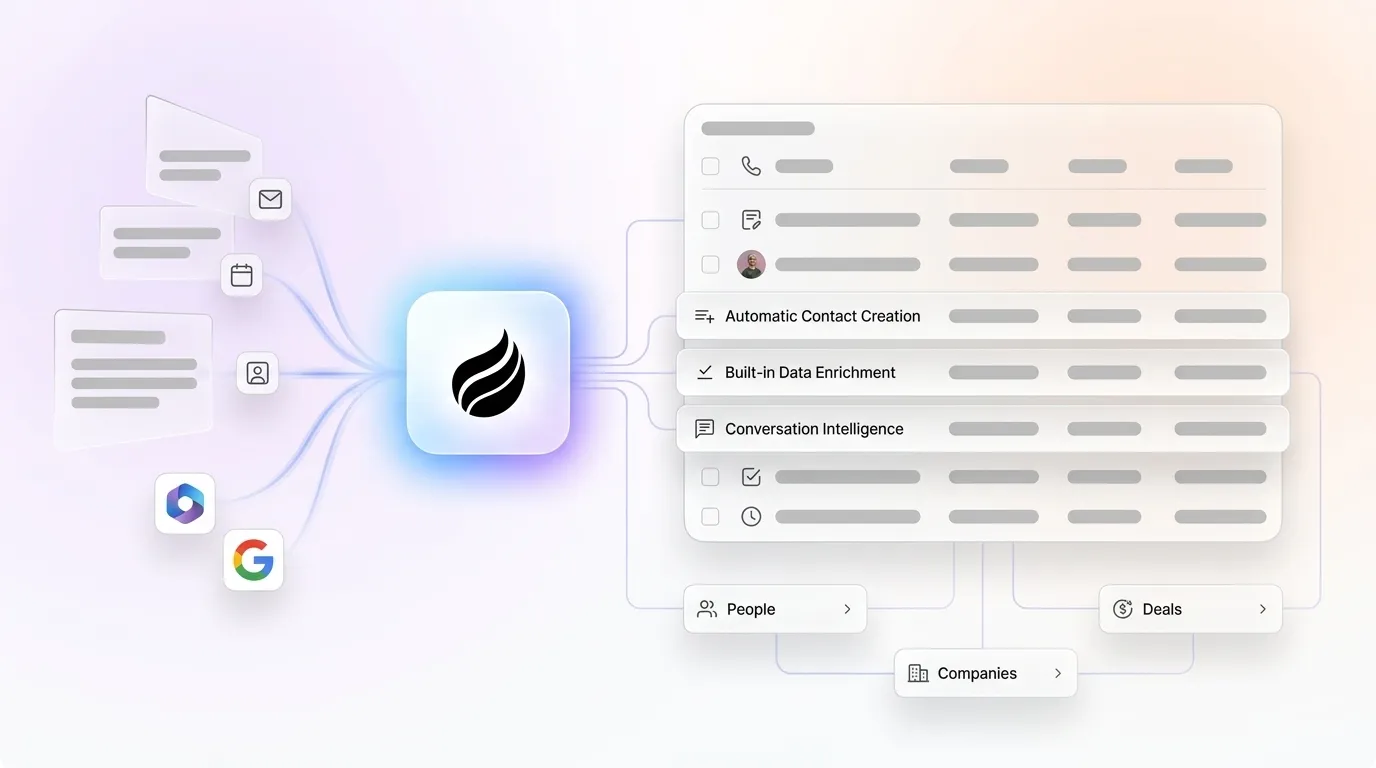
Automated data capture in 2026 uses natural language processing to extract key information from emails, call transcripts, and documents, then populates the appropriate CRM fields without manual input. The four functional layers work together in sequence to transform raw interactions into structured CRM records.

- Email and calendar capture: AI reads conversations, automatically logs activities into the CRM, and logs meetings based on calendar events, creating the base record that later layers enrich.
- Meeting transcription and analysis: Conversation intelligence features transcribe and analyze sales calls in real time via Zoom, Meet, or Teams, generate automated summaries, extract goals, pain points, stakeholders, and objections, and update CRM pipeline records without manual entry. These insights add context to the captured activity.
- Enrichment quality: Agents then augment raw contact records with job titles, funding data, and social profiles via licensed data partners. This external data fills gaps that conversations alone do not reveal and reduces reliance on standalone enrichment tools like ZoomInfo or Apollo.
- Duplicate handling: Advanced AI-assisted matching achieves 97.0% precision and 95.5% recall when merging duplicate records while preserving interaction history. This final step prevents enriched records from creating redundancy in the system.
Salesforce Data Entry: AI Tools That Actually Reduce Busywork
Coffee (Companion App for Salesforce)
Coffee connects to Salesforce through a simple authentication flow. The agent then scans Google Workspace or Microsoft 365 to auto-create contacts, log activities, enrich records with funding and LinkedIn data, and write post-meeting summaries structured to BANT, MEDDIC, or SPICED directly into Salesforce fields. Pipeline Compare visualizes week-over-week deal changes without manual CSV exports. Coffee saves reps 8–12 hours per week and is SOC 2 Type 2 and GDPR compliant. Pricing is seat-based with no usage metering on agent actions.

Salesforce Agentforce
Salesforce Agentforce executes tasks such as prospecting, lead qualification, and follow-up outreach without human intervention, but it operates only within the Salesforce ecosystem. Teams without Salesforce licenses cannot access it, and advanced AI features usually sit behind higher-tier plans, making AI integration expensive and time-consuming for small businesses.
Ringover CRM Autofill
Ringover’s CRM Autofill add-on automatically captures and syncs conversation data, call transcriptions, summaries, and interaction logs from business phone systems into Salesforce, HubSpot, and Pipedrive in real time. It focuses on voice channels and does not handle email or calendar capture independently.
Spiky.ai for CRM
Spiky.ai automatically creates and updates meeting records, linking calls from Google Meet, Teams, and Zoom to the relevant account, contact, and opportunity while enriching records with AI-generated summaries, next steps, and sentiment metrics. It removes manual field updates for BANT and custom fields based on call content but requires a separate CRM subscription and does not function as a standalone system of record.
MuleSoft / Zapier (iPaaS)
iPaaS solutions such as MuleSoft and Zapier enable automatic data transfers between marketing software, financial systems, and CRM platforms to reduce manual entry. These tools act as middleware layers, not AI agents. They move data between systems but do not transcribe calls, generate summaries, or produce pipeline intelligence.
HubSpot AI Data Entry: Companion Tools and Standalone Alternatives
Coffee (Companion App for HubSpot)
The same Coffee agent that serves Salesforce teams authenticates directly with HubSpot and writes enriched contact records, activity logs, and meeting summaries back to HubSpot properties. Teams keep HubSpot as the system of record while the agent handles all data-in work. The Pipeline Compare feature surfaces stalled deals and week-over-week changes without requiring HubSpot’s native reporting add-ons.
HubSpot Breeze AI
HubSpot Breeze Agents execute tasks such as prospecting, lead qualification, and follow-up outreach without human intervention. HubSpot’s Breeze AI toolset includes conversation intelligence capabilities that analyze customer interactions and assess sales team performance. Breeze is native to HubSpot, unavailable to teams on lower-tier plans, and does not serve Salesforce environments.
Clarify CRM
Clarify’s Ambient Intelligence architecture autonomously captures meeting data, enriches contacts via waterfall data sources, extracts key information from transcripts, and updates pipeline stages in the background without prompting or manual logging. Clarify operates as a standalone modern CRM and lacks the companion-agent deployment model needed by teams already committed to HubSpot or Salesforce.
Compare Coffee’s companion model to native HubSpot AI
Best-Fit Use Cases for Early-Stage and CRM-Committed Teams
Early-stage teams (1–20 people): Companies that have outgrown spreadsheets but view HubSpot or Pipedrive as expensive manual chores fit Coffee’s Standalone CRM well. The agent manages the system of record from day one and removes the change management burden of migrating an existing CRM. Setup requires only a Google Workspace or Microsoft 365 connection.

Salesforce or HubSpot-committed teams (10–50 people): RevOps leaders who have invested in Salesforce or HubSpot configurations, custom fields, and reporting should deploy Coffee as a Companion App. AI in CRM does not replace existing systems such as Salesforce or HubSpot; it functions as a decision and execution layer on top of the CRM as the system of record. This approach avoids rip-and-replace risk and quickly resolves low adoption and incomplete records.
For both scenarios, a practical rollout plan launches two to three high-impact, low-complexity pilot automations that deliver measurable value within 30–60 days, then scales using a two-speed implementation approach that balances quick wins with careful planning of complex workflows.
Risks and Limitations of AI CRM Data Entry Automation
Poor data quality leads to ineffective AI performance in CRM systems, so organizations must address data cleanliness and privacy measures before implementation. Specific risks include the following points.
- Hidden maintenance: Operational safeguards require scheduling regular monthly data audits, establishing duplicate-management rules, and enforcing role-based access controls. These activities represent ongoing costs rather than one-time setup tasks.
- Incomplete automation: Excessive automation can frustrate customers on complex or sensitive issues, requiring organizations to balance AI execution with human interaction. Human review of AI outputs helps prevent drift from compliance requirements.
- Integration gaps: Connecting AI systems only at the UI level instead of the data level limits effectiveness because the AI lacks access to accurate customer data, historical context, or relational records needed for reliable automation.
- Cost and tier restrictions: AI features are often reserved for top-tier licensing plans, which makes total cost of ownership higher than initial pricing suggests for native CRM AI tools.
Decision Framework for Matching Tools to Your Stack
Use the following criteria to select the right deployment model for your team.
- No CRM yet, 1–20 people: Deploy Coffee Standalone. The agent manages data in and data out from day one with no migration required.
- Salesforce or HubSpot in place, 10–50 people, low adoption: Deploy Coffee as a Companion App. The agent writes enriched data back to the existing system of record without disrupting current configurations.
- Evaluating governance requirements: A minimum governance checklist for production AI agent deployment includes audit trails, permission scoping, human-in-the-loop gates for high-stakes actions, rollback capability, and data quality contracts enforcing CRM field standards before agents read or write records. Confirm that any vendor meets this checklist before signing.
- Measuring ROI: ROI of AI agents in revenue operations should be measured with a KPI tree linking agent activity to pipeline value, win rate, cycle time, forecast accuracy, and deal velocity. Do not rely only on hours saved. AI CRM implementations can show positive ROI within the first year, and quick wins like automated data enrichment and lead scoring often pay back in three to four months.
Frequently Asked Questions
How long does implementation take without replacing Salesforce or HubSpot?
For a companion-agent deployment like Coffee, implementation usually requires a single authentication step that connects the agent to Google Workspace or Microsoft 365 and authorizes the CRM sync. Most teams see the agent actively logging contacts, activities, and meeting summaries within the first business day. A structured pilot covering two to three high-impact workflows, such as contact auto-creation and post-call summaries, generally delivers measurable results within 30 to 60 days. Full-scale rollout follows once the pilot KPIs are confirmed.
How does AI-generated CRM data quality compare to tools like ZoomInfo?
Modern AI CRM agents, including Coffee, source enrichment data from licensed data partners that cover job titles, funding rounds, and LinkedIn profiles. For most use cases at 10–50 person companies, this built-in enrichment matches the value of standalone enrichment subscriptions. AI agents also capture unstructured data such as email text, call transcripts, and meeting notes, which ZoomInfo and similar tools do not process. The CRM record then reflects both structured firmographic data and real interaction context, creating a more complete picture of each deal.
What security certifications should an AI data entry tool have?
At minimum, require SOC 2 Type 2 certification, GDPR compliance, and confirmation that customer data is not used to train public AI models. Role-based access controls and data residency options are additional requirements for teams handling sensitive pipeline data. Coffee meets all of these standards, is SOC 2 Type 2 and GDPR compliant, and never uses customer data to train public models.
Will reps actually adopt an AI data entry tool?
Adoption failure in legacy CRMs often stems from reps being required to serve the software rather than the software serving them. AI agents invert this dynamic because the agent handles the busywork. Reps open the CRM and find records already populated, meetings already summarized, and follow-up emails already drafted for review. Coffee’s design philosophy focuses on becoming a co-pilot that reps rely on rather than a database they resent. Teams that pilot the agent on a single high-friction workflow, such as post-call logging, typically see voluntary adoption expand once reps experience the time savings firsthand.
Can Coffee integrate with tools beyond Salesforce and HubSpot?
Coffee currently supports integrations via Zapier, which connects the agent to a broad range of sales and marketing tools. Deeper native integrations sit on the product roadmap. For teams whose primary system of record is Salesforce or HubSpot, the direct API sync covers the full data-in workflow without requiring Zapier as an intermediary.
Conclusion: Turning CRM from Chore to Revenue Engine
In 2026, the gap between teams that automate CRM data entry and those that rely on manual input shows up in pipeline accuracy, forecast reliability, and selling hours recovered. The eight evaluation criteria in this guide, including native integrations, hours saved, multi-channel capture, duplicate prevention, pipeline intelligence, deployment model, pricing, and security, provide a consistent framework for comparing any tool on the market. Coffee is the only solution that meets teams where they are, acting as a Standalone CRM for early-stage companies and as a Companion App for Salesforce and HubSpot-committed teams, with the same proactive agent delivering good data in and accurate pipeline intelligence out across both models.


