Written by: Doug Camplejohn, CEO & Co-Founder, Coffee | Last updated: July 18, 2026
Key Takeaways for Automating Gong-to-CRM Sync
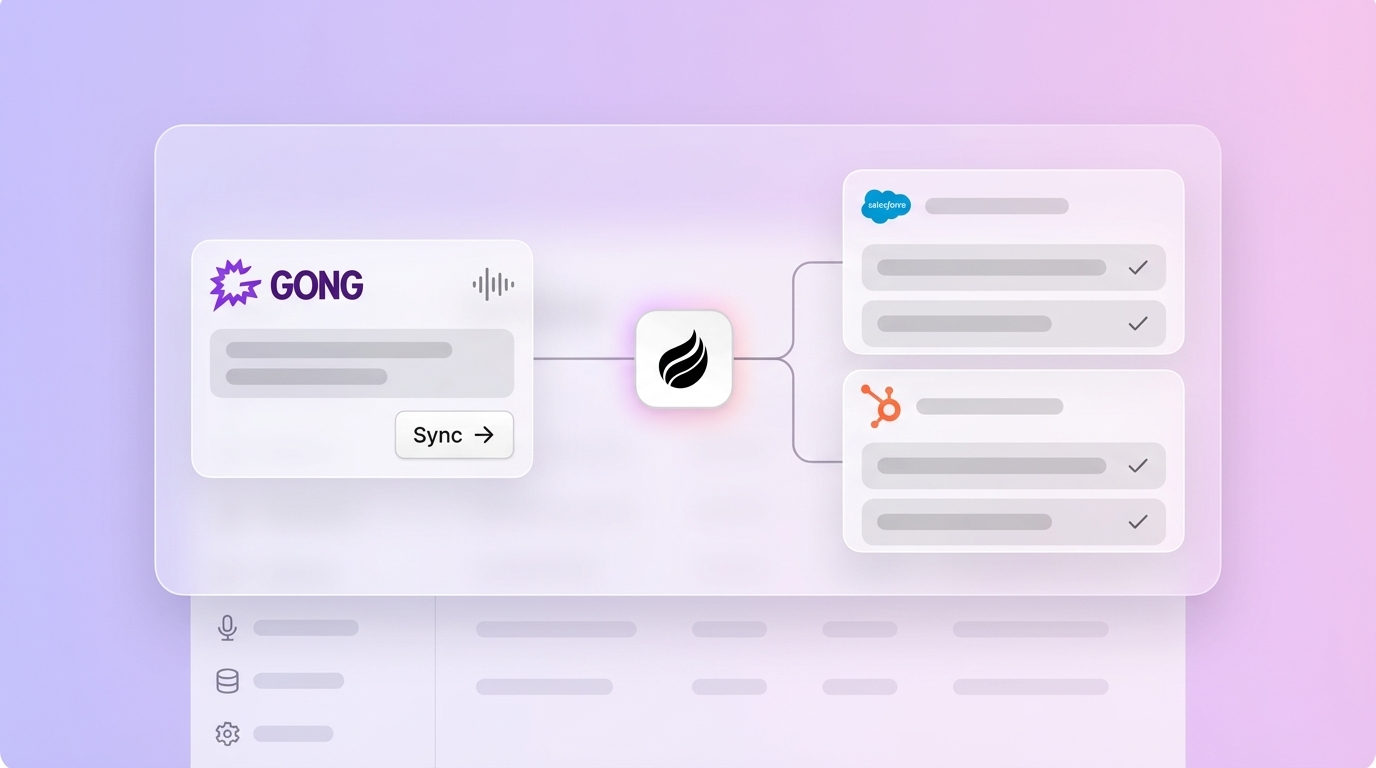
- A five-step workflow automates Gong call transcription and syncs structured notes directly to Salesforce or HubSpot without manual rep input.
- AI structuring prompts extract MEDDICC fields with confidence scoring, enabling high-accuracy auto-commit while routing low-confidence items for review.
- Webhook ingestion combined with identity matching ensures transcripts are correctly linked to CRM contacts and opportunities in near real time.
- Native Gong connectors and Zapier flows fall short on structured extraction and custom object writeback, whereas agent-based automation handles both seamlessly.
- Deploy Coffee across your sales team to eliminate manual CRM updates after every call.
Prerequisites and Readiness Checklist for Gong Automation
Before building the workflow, confirm the following are in place so the automation can run reliably from day one.
- A Gong account with API access and webhook delivery enabled
- A Salesforce or HubSpot instance with admin rights to create custom fields and objects
- A defined sales methodology such as MEDDICC, BANT, or SPICED with field names agreed upon by RevOps
- An automation layer account (Coffee Companion App, or an n8n/Make instance for custom builds)
- OAuth credentials or API keys for both Gong and the target CRM
Step 1: Connect Gong to Your Automation Layer
Start by connecting Gong to the automation layer so every completed call can trigger downstream processing. Navigate to Gong’s API settings and generate an access key and secret. In the Coffee Companion App, or your chosen automation platform, authenticate against the Gong API using OAuth 2.0. Coffee expanded call recording options in January 2026 via Zapier integration with tools including Gong, Fathom, and Fireflies, so the connection can be established through a direct OAuth handshake or a Zapier trigger depending on your stack.
After authentication, configure Gong to emit a call.completed webhook event. A minimal payload looks like this:
{ "event": "call.completed", "callId": "abc123", "startTime": "2026-07-18T14:00:00Z", "duration": 2847, "participants": [ { "name": "Jane Smith", "email": "jane@prospect.com", "role": "prospect" }, { "name": "Alex Rivera", "email": "alex@yourco.com", "role": "rep" } ], "transcriptUrl": "https://api.gong.io/v2/calls/abc123/transcript" }Store the callId and transcriptUrl. Both values are required in later steps.
Step 2: Set Up Webhook or Direct Agent Transcript Ingestion
Next, configure a webhook endpoint so Gong can deliver each completed call for processing. Set up an HTTPS endpoint that receives the call.completed payload and immediately fetches the full transcript from the transcriptUrl. The endpoint must respond with HTTP 200 within five seconds to prevent Gong from retrying delivery.
Handle authentication carefully at this stage because expired OAuth tokens and mismatched scopes are common failure points. Ensure the Gong API scope includes api:calls:read:transcript. If you use Coffee as the agent layer, authentication is handled automatically after the initial OAuth handshake, so you avoid maintaining token refresh logic.
Native CRM automation breaks heavily at the identity routing layer because platforms mandate rigid matching criteria such as exact phone number matches or the presence of participant emails for Zoom recordings. To avoid this, normalize participant identities before extraction. Match each participant’s email address against existing CRM contacts and accounts before the transcript reaches the structuring layer. Coffee’s agent handles both transcript ingestion and identity matching automatically, eliminating the need to build custom normalization logic.
Step 3: Apply AI Structuring Prompts That Output CRM-Ready JSON
Once the transcript is ingested and participants are matched to CRM records, extract structured qualification data from the raw conversation text. Pass the raw transcript text to an LLM with a structured extraction prompt. The prompt must specify the exact output schema so the resulting JSON maps directly to CRM field API names. Coffee launched Custom Meeting Briefings and Summaries in February 2026, enabling users to define exact formats and focuses from high-level executive summaries to granular technical breakdowns.
Below is a copy-pasteable MEDDICC extraction schema that maps each qualification element to a JSON field, with confidence scoring and evidence pointers for every value:
{ "meddicc": { "metrics": { "value": "", "confidence": 0.0, "evidence": "" }, "economic_buyer": { "name": "", "title": "", "confidence": 0.0, "evidence": "" }, "decision_criteria": { "value": "", "confidence": 0.0, "evidence": "" }, "decision_process": { "value": "", "confidence": 0.0, "evidence": "" }, "identify_pain": { "value": "", "confidence": 0.0, "evidence": "" }, "champion": { "name": "", "confidence": 0.0, "evidence": "" }, "competition": { "competitors": [], "confidence": 0.0, "evidence": "" } }, "next_steps": [ { "action": "", "owner": "", "due_date": "", "confidence": 0.0 } ], "pain_points": [], "competitor_mentions": [] }Every extracted field must store an evidence pointer, extraction method, timestamp, and field-level confidence score (0.00–1.00) to enable traceability and granular human review when confidence is low. Apply three confidence bands: High (≥0.85, auto-commit), Medium (0.65–0.84, queue for rep review), and Low (<0.65, flag for manual input).
Step 4: Write Structured Data Back to Salesforce or HubSpot
After the JSON is generated, write each field back to the CRM so reps see updated qualification data without manual typing. Use the CRM’s native REST API to write each JSON field to the corresponding CRM property. The tables below map each JSON field from Step 3’s schema to its target CRM object and API field name, along with the confidence-based write rule that controls whether the value auto-commits or queues for review.
Salesforce Field Mapping
| JSON Field | Salesforce Object | API Field Name | Write Rule |
|---|---|---|---|
| meddicc.metrics.value | Opportunity | MEDDICC_Metrics__c | Append if confidence ≥0.85 |
| meddicc.economic_buyer.name | Opportunity | Economic_Buyer__c | Append if confidence ≥0.85 |
| next_steps[0].action | Task | Subject | Auto-create Task record |
| next_steps[0].due_date | Task | ActivityDate | Auto-create Task record |
| meddicc.identify_pain.value | Opportunity | Identify_Pain__c | Append if confidence ≥0.65 |
| competitor_mentions | Opportunity | Competitor_Mentions__c | Append always |
HubSpot Field Mapping
| JSON Field | HubSpot Object | Property Name | Write Rule |
|---|---|---|---|
| meddicc.metrics.value | Deal | meddicc_metrics | Append if confidence ≥0.85 |
| meddicc.champion.name | Deal | champion_name | Append if confidence ≥0.85 |
| next_steps[0].action | Task | hs_task_subject | Auto-create Task record |
| pain_points | Deal | identified_pain_points | Append if confidence ≥0.65 |
| competitor_mentions | Deal | competitor_mentions | Append always |
Safe fields for automatic writeback include activity logs, last activity date, appended call summaries, and task creation for next steps, while high-risk fields such as deal stage, forecast category, amount, and close date should never be auto-written without explicit human approval and strong evidence. These guardrails are enforced natively in Coffee’s agent, whereas Zapier flows require you to build conditional logic manually for each write rule. Coffee released improved summary templates in November 2025, customizable to match workflows and writable back to Coffee, HubSpot, or Salesforce.
Step 5: Validate and Monitor the Sync
Validation confirms that the automation extracts accurate data and writes it to the correct CRM records. Run the following data-quality checks after the first 30 days to confirm the workflow is extracting accurate data and writing it to the correct CRM records:
- Field coverage rate: percentage of closed calls with all six core MEDDICC fields populated, which shows whether the extraction prompt is finding every required qualification element.
- Confidence distribution: ratio of High to Medium to Low extractions, where a high Low ratio signals prompt tuning is needed to improve extraction accuracy.
- Identity match rate: percentage of calls successfully linked to an existing CRM contact and opportunity, with low match rates pointing to participant email normalization issues.
- Sync latency: time from call end to CRM field update, with a target under 15 minutes so reps see updated records before their next call.
A best-practice implementation runs in “suggest only” mode for the first 30 days so all extracted fields go to the rep review queue before any auto-commit is enabled. After the validation period, promote High-confidence fields to auto-commit and keep Medium-confidence fields in the review queue.
Native Gong Connectors vs. Agent-Based Automation
Before you commit to a specific automation approach, compare native Gong connectors, Zapier flows, and agent-based platforms like Coffee. The table below highlights how each option performs across six capabilities that determine whether your workflow can run autonomously.
| Capability | Native Gong Connector | Zapier Flow | Coffee Agent Layer |
|---|---|---|---|
| Transcript ingestion | Automatic via native sync | Trigger-based, polling delay | Webhook-driven, near real time |
| MEDDICC field extraction | Available via Gong AI Data Extractor with admin configuration | Not supported natively, requires custom prompt step | Built in, customizable schema per methodology |
| Confidence scoring per field | Not exposed to CRM | Not available | Per-field confidence with auto-commit thresholds |
| Identity matching | Breaks on missing phone or email matches | Relies on exact field match in Zap filter | Fuzzy match against CRM contacts and accounts |
| Writeback to custom CRM objects | Limited to standard Activity fields | Basic integrations only log a link to recordings in the CRM activity feed | Writes to any custom Opportunity or Deal property |
| Maintenance overhead | Low for standard fields, high for custom schemas | High, Zap steps break on API changes | Low, agent adapts to schema changes |
Validation: Data Quality, Adoption Metrics, and Time-Saved KPIs
Once technical metrics confirm the workflow is operating correctly, measure the business impact on rep productivity and data quality. Automatic activity capture can reduce rep CRM time significantly. This includes reduced time logging calls and emails as well as contact enrichment.
MEDDIC field completion rates in CRM records have been observed to rise from 20% to 90% complete overnight after activating call-to-CRM automation. Vendilli, a marketing agency, saw more consistent CRM data after deploying structured field automation from call data. Track these KPIs monthly and share them with sales leadership to sustain adoption.
Variations: Scaling to Larger Teams and Different Sales Motions
Teams can extend this workflow across multiple methodologies and segments without redesigning the core architecture. For teams running BANT or SPICED alongside MEDDICC, create separate JSON schemas per methodology and route calls to the correct schema based on the deal stage stored in the CRM at call time. Coffee introduced an Intelligence layer in February 2026 that allows users to define and store deep context on business model, product specifics, ICP, and competitors for tailored AI suggestions and insights, and this context feeds directly into extraction prompts, improving accuracy without prompt re-engineering.
Enterprise teams with custom Salesforce objects, such as a dedicated MEDDICC object linked to Opportunity, can extend the writeback step to POST against the custom object’s API endpoint rather than the standard Opportunity fields. Once MEDDIC scores are written to CRM fields, Salesforce Flow or HubSpot Workflows can trigger downstream automation such as stage routing, manager notifications for missing qualification evidence, or rep nudges without any manual intervention. Deploy Coffee across your entire team in a single afternoon, with no custom middleware or prompt engineering required.
FAQ
How long does it take to set up automated Gong-to-CRM note syncing?
Most teams complete the initial setup within one business day. This setup includes connecting Gong, configuring the webhook endpoint, defining the extraction schema, and mapping fields in Salesforce or HubSpot. The first 30 days should run in “suggest only” mode so reps validate extractions before auto-commit is enabled. Full autonomous operation, including confidence-based auto-commit for High-confidence fields, is typically live within 30 to 45 days of initial deployment. Coffee’s Companion App compresses this timeline further because authentication, identity matching, and field mapping are handled by the agent rather than built manually.
What ongoing maintenance does the workflow require?
Ongoing maintenance focuses on keeping extraction quality high while the sales process evolves. The primary maintenance tasks are prompt tuning when extraction accuracy drifts, schema updates when the sales methodology changes, and monthly reviews of unmatched calls. Native Zapier flows require additional maintenance whenever Gong or CRM API versions change because Zap steps break on schema updates. An agent-based layer like Coffee adapts to API changes automatically, so maintenance centers on methodology-level decisions rather than technical plumbing. Plan for a quarterly review of confidence distribution data to identify fields that consistently score Low and may need prompt refinement.
Is the data secure and compliant?
Data security and compliance remain central throughout this workflow. Coffee is SOC 2 Type 2 and GDPR compliant. Call transcript data is not used to train public models. For teams in regulated industries, confirm that your Gong account’s data residency settings align with your compliance requirements before enabling webhook delivery to any external endpoint. All data written to Salesforce or HubSpot remains within those platforms’ existing security perimeters. Field-level confidence scores and evidence pointers stored alongside extracted values provide an audit trail for any compliance review.
How does the process change as the team grows?
The core five-step workflow scales horizontally as headcount increases. Adding reps does not require changes to the automation architecture. As call volume increases, the primary scaling consideration is webhook endpoint throughput, so ensure the ingestion layer can handle concurrent payloads during peak hours, typically 10 AM to 2 PM in each time zone. For teams running multiple sales motions simultaneously, route calls to methodology-specific extraction schemas based on the opportunity type field in the CRM. Coffee’s agent handles multi-methodology routing natively, and its seat-based pricing model means the agent’s labor scales with call volume without additional per-call metering costs.
What happens when the AI extraction is wrong?
The confidence scoring system acts as the main safeguard against incorrect data. Fields extracted with Low confidence, below 0.65, are flagged for manual input and never auto-committed to the CRM. Medium-confidence fields, from 0.65 to 0.84, appear in a rep review queue with the source transcript snippet displayed alongside the proposed value, so the rep can confirm or correct in seconds rather than re-reading the full transcript. High-confidence fields, 0.85 and above, auto-commit after a configurable delay window, typically 30 minutes to four hours, which gives reps a correction window before the value is finalized. Every auto-committed field stores an evidence pointer back to the transcript location, making errors traceable and correctable without data loss.
Conclusion and Next Steps
The five-step workflow of connecting Gong, ingesting transcripts via webhook, applying AI structuring prompts, writing JSON to CRM fields, and validating the sync converts an unreliable manual process into a deterministic, auditable pipeline. The result is field completion rates that jump from under 25% to over 90% within the first month, significant weekly rep time recovered, and forecast data that reflects what was actually said on calls rather than what reps remembered to type afterward.
Native Gong connectors and Zapier flows leave structured extraction, confidence scoring, and custom object writeback as unsolved problems. Coffee’s agent layer solves all three without requiring RevOps to maintain brittle middleware. The agent ingests transcripts, structures them against your methodology, and writes accurate records back to Salesforce or HubSpot, autonomously, on every call.
Turn every Gong call into a fully populated CRM record automatically with Coffee.