Written by: Doug Camplejohn, CEO & Co-Founder, Coffee
Key Takeaways
- HubSpot data warehouse integration syncs CRM records into platforms like Snowflake or BigQuery so you can run unified analytics, preserve history, and power advanced BI reporting.
- Three primary methods exist: native HubSpot connectors for Enterprise accounts with scheduled syncs, third-party ETL tools with flexible, near-real-time pipelines, and reverse ETL platforms that push warehouse insights back into HubSpot.
- Native connectors give Enterprise teams a low-friction export path but lack real-time sync and full property history, while third-party ETL adds flexibility and dbt integration at a higher price.
- Reverse ETL works best for teams that already have a warehouse and want to activate modeled scores and segments inside HubSpot, even though it adds a second tool to the stack.
- Data quality in HubSpot determines whether any warehouse project succeeds, so start a Coffee trial and send accurate, complete data from day one.
What HubSpot Data Warehouse Integration Actually Does
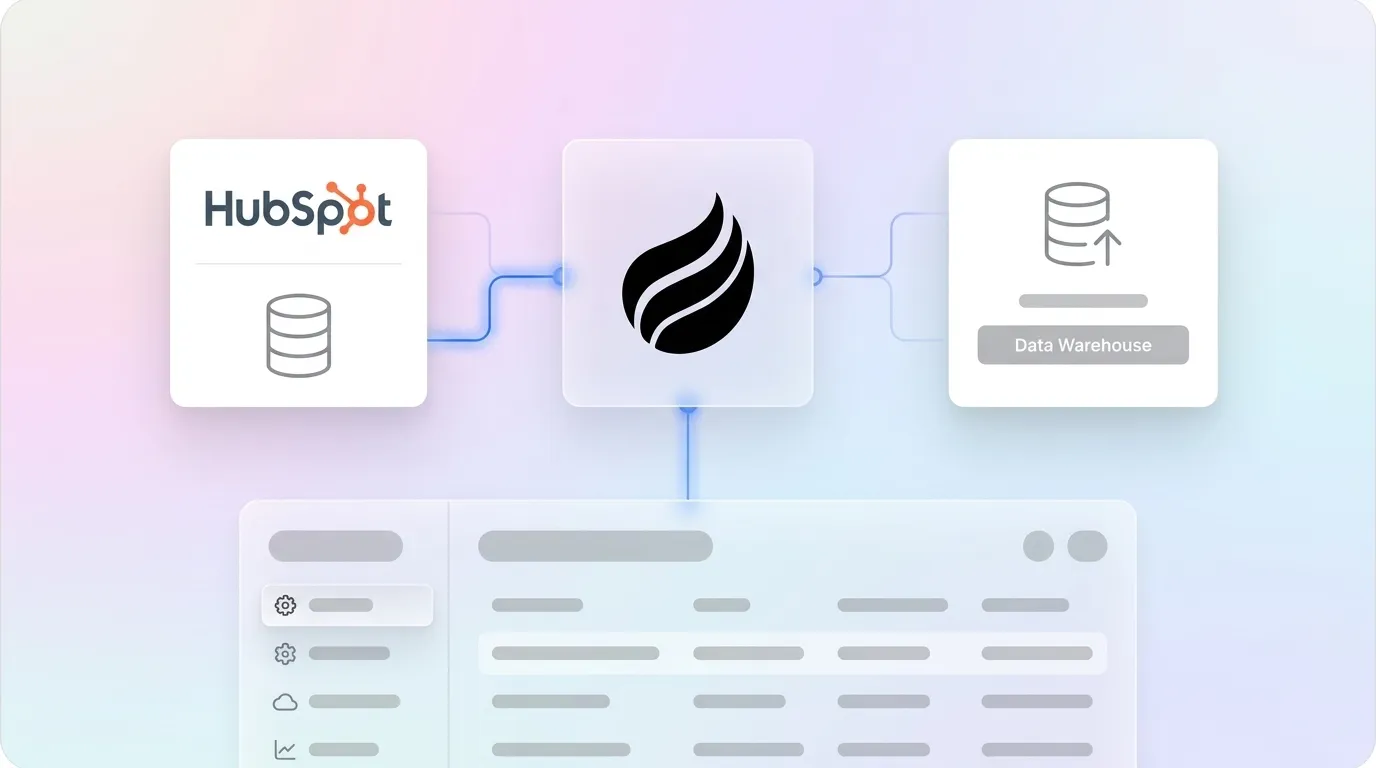
HubSpot data warehouse integration syncs CRM records such as contacts, companies, deals, activities, and custom objects from HubSpot into a cloud data warehouse like Snowflake or Google BigQuery. This connection creates a single place to join HubSpot data with other systems, preserve history, and power BI tools such as Tableau or Looker. It also enables reverse ETL workflows that push enriched warehouse data back into HubSpot so sales teams can act on those insights.
Why Teams Connect HubSpot to a Data Warehouse
HubSpot’s native reporting hits limits quickly. The Pro plan caps standard reporting at 100 reports, and HubSpot does not store full property change history. Moving data into a warehouse solves several problems at once.
- Unified analytics: Joining HubSpot deal data with product usage, billing, or support data in Snowflake lets you calculate Customer Acquisition Cost and spot high-engagement trial users who have not converted. HubSpot alone cannot support these analyses reliably.
- Historical preservation: Daily deal snapshots and SCD Type 2 on key account attributes are required to reproduce last quarter’s pipeline report. The warehouse becomes the historical record that HubSpot does not provide.
- BI tool independence: Finance and leadership query a single source of truth in Looker, Tableau, or Metabase without disrupting HubSpot dashboards used by sales reps.
- Reverse ETL activation: Warehouse-computed scores such as churn risk, engagement level, and CAC tier sync back to HubSpot properties so sales teams act on insights inside their existing workflows.
Every native option shares one limitation. HubSpot’s native sync runs on a schedule, not in real time. Teams that need sub-minute latency rely on third-party ETL tools or custom pipelines.
Try Coffee so the data entering your warehouse starts clean and stays reliable.
Integration Methods Compared: Native, ETL, Reverse ETL, and Middleware
Each integration category trades off latency, flexibility, and cost in different ways. The table below summarizes the main differences, and the following sections walk through each method in more detail.
| Method | Real-Time? | Typical Cost | Best For |
|---|---|---|---|
| Native (HubSpot to Snowflake / BigQuery) | Scheduled only | Included in Enterprise tier; specific monthly cost not documented | Teams on HubSpot Enterprise that want a low-friction export to Snowflake or BigQuery |
| Third-Party ETL (Fivetran, Airbyte, Stitch) | Near-real-time on higher tiers, batch on standard | Managed tools with monthly fees, or one-time spend for custom scripts | Teams that need flexible pipelines, property history, and warehouse-agnostic connectors |
| Reverse ETL (Hightouch, Census / Fivetran Activations) | Hourly to daily batch | Starter and enterprise plans with tiered pricing | Teams pushing warehouse-modeled data such as scores and segments back into HubSpot |
Let’s look at each option more closely, starting with HubSpot’s native connectors.
Native Integrations: HubSpot to Snowflake and BigQuery
HubSpot currently offers two native warehouse connectors, both in beta and available only on Enterprise-tier subscriptions.
Snowflake Direct Sync is a one-way integration from Snowflake into HubSpot. It supports contacts, companies, deals, and custom objects. Practical limits include 10 GB per table or view, 30 million records per sync run, and 200 columns. It is available with HubSpot Data Hub Enterprise and Smart CRM Enterprise subscriptions. Filtering during sync is not supported, so you filter in Snowflake by creating a view before the sync runs. Three sync modes exist: Create and update, Create only, and Update only.
To connect HubSpot to Snowflake natively:
- Install the Snowflake app from the HubSpot Marketplace as a Super Admin.
- Connect your Snowflake account using the account identifier, username, and a public key for authentication.
- Select the database, schema, table, and compute warehouse in HubSpot.
- Configure field mappings between Snowflake columns and HubSpot CRM properties.
- Set a match key to avoid duplicate records, then schedule the sync frequency.
- If your Snowflake environment restricts inbound connections, allowlist HubSpot’s CIDR ranges (e.g., US East: 54.174.62.128/26, EU: 143.244.87.0/25).
BigQuery (beta) moves HubSpot data into BigQuery on a scheduled basis. Sync frequency options include once, every 6 hours, every 12 hours, daily, weekly, and monthly. Sensitive data and the object_x_views object are not supported. Each object type can only be exported in one sync configuration per HubSpot account.
To connect HubSpot to BigQuery natively:
- Confirm you have a Data Hub Enterprise subscription and Super Admin access in HubSpot.
- Create a Google Cloud service account with BigQuery Data Viewer, BigQuery Job User, and Storage Object Owner roles.
- Provision a Google Cloud Storage bucket using the URI format
gs://{bucket}/hubspot-dataout/{portalId}/{runId}/{tableName}/. - Install the BigQuery integration from HubSpot and authenticate with the service account.
- Select the HubSpot objects and fields to export, then configure sync frequency.
- Allowlist HubSpot proxy IPs if your GCP project restricts inbound access (e.g., NA1: 54.174.62.128/26).
Third-Party ETL Tools: Fivetran, Airbyte, Stitch, and Others
Third-party ETL platforms extract HubSpot data and load it into many different warehouses, with more flexibility and broader connector support than native options. The table below compares leading tools on pricing model, sync frequency, and best use case.
| Tool | Pricing Model | Sync Frequency | Best For |
|---|---|---|---|
| Fivetran | Monthly Active Rows (MAR) with a free tier and low base price | Every 15 minutes on Standard and every 1 minute on Enterprise | Teams that want fully managed pipelines with property history tables and dbt integration |
| Airbyte | Free self-hosted OSS or Cloud with a minimum monthly spend and credit-based pricing | Hourly on the Standard Cloud tier | Data engineering teams comfortable with open-source tooling and self-hosting |
| Stitch | Row-based pricing with Standard plans starting at a fixed monthly fee | Minutes to hours via cron using the HubSpot v4 connector | Startups and SMBs that want a lightweight, low-cost managed ELT option |
Fivetran’s dbt_hubspot package materializes 147 models, producing enriched contact, company, and deal models plus analysis-ready event tables. This capability helps teams already invested in dbt. At the same time, MAR-based pricing can cause bills to spike during high-activity periods, so model costs at 6 and 12 months of expected data growth before committing.
Reverse ETL: Hightouch, Census (Fivetran Activations), and Polytomic
Reverse ETL tools move in the opposite direction and push warehouse-modeled data back into HubSpot. Reverse ETL copies data from a cloud data warehouse into operational tools like CRMs, which lets teams act on insights where they already work. Common use cases include syncing churn risk scores, product usage data, and customer health scores to HubSpot contact and company properties.
Every reverse ETL tool requires a cloud data warehouse as the source of truth. If you do not have a warehouse, you must build one first, which adds ongoing warehouse costs for a mid-sized B2B SaaS company. Reverse ETL also depends on a separate ETL tool to populate the warehouse, so you manage a two-tool stack with more cost and complexity.
Hightouch offers a free tier for a limited number of destinations and synced rows, with paid plans starting in the mid-hundreds per month. Census, now Fivetran Activations, uses tiered pricing by source, with starter plans listed in several hundred dollars per month ranges.
Specialized Middleware for HubSpot and Warehouses
Vendors such as Datawarehouse.io provide purpose-built middleware for HubSpot and warehouse integration. These products shorten setup time and hide some complexity. They also tie you to a specific vendor and often lack the flexibility of general-purpose ETL platforms. iPaaS middleware for HubSpot integrations often includes a one-time setup fee plus an ongoing platform subscription. Compare these options against the decision framework below before you commit.
How to Choose the Right Integration Method
Latency needs, budget, and technical resources drive the integration decision. Use the questions below to narrow your options.
- Real-time requirements: If downstream consumers tolerate a 15-minute or longer delay, batch processing usually makes the most sense. Native connectors and standard ETL tiers cover this need. True sub-minute latency calls for Fivetran Enterprise or a custom webhook-driven pipeline.
- Budget constraints: Native connectors come bundled with HubSpot Enterprise but only support specific destinations. Managed ETL pipelines add ongoing monthly fees, while custom ETL scripts require a one-time build. Reverse ETL adds warehouse infrastructure costs on top of tool pricing.
- Available technical skills: No-code tools like Skyvia or Coupler.io work well for RevOps-owned pipelines. Python and SQL-first tools such as Airbyte or AWS Glue expect data engineering ownership.
- Direction of data flow: Pulling CRM data into the warehouse calls for ETL. Pushing warehouse-computed insights back to HubSpot calls for reverse ETL or HubSpot’s native Snowflake Direct Sync.
- Number of destinations: Reverse ETL fits when you sync to multiple tools or need complex cross-source transformations. Direct sync works better when you only care about HubSpot and want to launch in days instead of months.
Common Pitfalls and Practical Best Practices
Several failure modes appear across all integration methods, and addressing them early prevents painful rework.
- Field mapping mismatches: Field mapping mismatches are the most frequent cause of HubSpot sync failures, often when a HubSpot property and the connected field use incompatible types. Map every field explicitly before enabling sync.
- API rate limits: HubSpot enforces 100 requests per 10 seconds for private apps. Use batch endpoints that handle up to 100 records per request and implement exponential backoff for HTTP 429 errors.
- Schema drift: Schema drift, association gaps, and timestamp ambiguity often appear when HubSpot properties change after the pipeline is live. Build schema evolution handling into the pipeline from day one.
- Silent data corruption: Faulty integrations can overwrite populated HubSpot properties with blanks when the external system acts as the source of truth. Test blank-overwrite behavior in a sandbox before production.
- Duplicate records: Duplicate record creation is a frequent HubSpot integration failure. Run a test batch of records that already exist in both systems and confirm that zero duplicates appear before going live.
The most consequential pitfall is data quality in HubSpot before any pipeline runs. Improving data quality on the HubSpot side is a prerequisite for Snowflake integration. Poor data quality costs organizations an average of $12.9 million per year, and a warehouse pipeline amplifies that cost by replicating bad data at scale. Coffee’s market data shows that 71% of sales reps spend too much time on data entry, leaving only 35% of their time for selling, so the records flowing into your warehouse often start from incomplete, manually entered data.
This data quality problem is so fundamental that no integration method can fix it after the fact. The next section introduces an AI agent that addresses data quality at the source.
How Coffee’s AI Agent Fixes HubSpot Data at the Source
Integration methods cannot fix bad source data. If contacts miss job titles, deals lack close dates, and activity logs stay empty because reps skipped updates, the warehouse inherits every gap. The problem is structural because legacy CRMs depend on humans to enter data reliably, and humans often skip it.

Coffee is an AI agent that runs as a Companion App on top of HubSpot and automates the data entry, enrichment, and activity logging that reps avoid. After connecting to Google Workspace or Microsoft 365, Coffee scans emails and calendars to auto-create contacts and companies. It logs last activity and next activity autonomously and enriches records with job titles, funding data, and LinkedIn profiles through licensed data partners. Every interaction is captured without manual input.

The result is accurate and complete data flowing from HubSpot into your warehouse, regardless of the integration method you choose. Coffee saves reps 8–12 hours per week by removing manual data entry and ensures that warehouse analytics built on that data stay trustworthy. With a simple authentication, Coffee syncs data, enriches it, and writes insights back to HubSpot, which makes it the foundational layer that any warehouse integration depends on.

Start Coffee for HubSpot and stop sending incomplete CRM data into your warehouse.
Conclusion: Build Your Warehouse on Clean HubSpot Data
The choice between native connectors, third-party ETL tools, and reverse ETL platforms depends on latency needs, budget, and technical resources. Native HubSpot connectors to Snowflake and BigQuery give Enterprise customers the lowest-friction starting point. Managed ETL platforms such as Fivetran add flexibility and property history at higher cost. Reverse ETL tools like Hightouch and Census activate warehouse insights back into HubSpot but require existing warehouse infrastructure and introduce a second tool to manage.
Every method shares the same dependency, which is the quality of data in HubSpot at the moment of extraction. Coffee’s AI agent addresses that dependency by automating data capture and enrichment at the source. Whatever pipeline you build then carries clean, complete data from day one.
Make your HubSpot data warehouse-ready with Coffee and give your analytics a reliable foundation.
Frequently Asked Questions
Is HubSpot’s native Snowflake sync real-time?
HubSpot’s native Snowflake Direct Sync runs on a scheduled basis rather than in real time. Users can configure the sync frequency and trigger manual re-syncs at any time, but the integration does not support continuous or event-driven updates. Teams that require near-real-time data in Snowflake should evaluate third-party ETL platforms such as Fivetran, which syncs every 15 minutes on its Standard plan and every minute on Enterprise, or consider a custom webhook-driven pipeline for latency-sensitive use cases.
What is reverse ETL?
Reverse ETL copies data from a cloud data warehouse back into operational tools such as CRMs, email platforms, and ad networks. For HubSpot, reverse ETL usually means pushing warehouse-computed values such as churn risk scores, product usage metrics, customer health scores, or CAC tiers into HubSpot contact and company properties so sales and marketing teams can act on those insights inside the CRM. Tools like Hightouch and Census, now Fivetran Activations, lead this category. HubSpot’s Snowflake Direct Sync also functions as a reverse ETL mechanism when you use it to push Snowflake-modeled data into HubSpot CRM objects.
How much does it cost to integrate HubSpot with a data warehouse?
Costs vary significantly by method. HubSpot’s native connectors to Snowflake and BigQuery come bundled with Data Hub Enterprise and Smart CRM Enterprise subscriptions, so you do not pay an extra connector fee, although the underlying HubSpot subscription represents a major investment. Managed ETL platforms such as Fivetran or Airbyte add ongoing monthly spend, while custom ETL scripts require a one-time build that then needs maintenance. Reverse ETL tools use tiered pricing that starts with lower-cost starter plans and scales to higher enterprise tiers. These figures exclude the warehouse itself, where Snowflake and similar platforms charge based on usage, and a mid-sized B2B SaaS company often pays a recurring monthly warehouse bill. Industry practice also assumes 10–20% of the initial build cost each year for ongoing maintenance of any custom integration.
Can I use Coffee with HubSpot?
Coffee integrates directly with HubSpot through a Companion App. A simple authentication lets the Coffee Agent connect to HubSpot and immediately begin automating data entry, enriching contact and company records, logging activities from emails and calendar events, and writing insights back to HubSpot. Coffee keeps HubSpot as the system of record and acts as the intelligent layer that keeps HubSpot’s data clean and complete without extra work from sales reps. This makes Coffee a practical prerequisite for any HubSpot data warehouse integration because it ensures that the pipeline carries accurate data from the source.
What HubSpot objects can be synced to a data warehouse?
Core objects supported across native and third-party integrations include contacts, companies, deals, tickets, and custom objects. Engagement data such as calls, emails, meetings, and notes can also sync, although high-volume engagement history requires careful handling because of API rate limits and data volume. Property history tables that track changes to contact, company, and deal properties over time are available through tools like Fivetran, while availability through HubSpot’s native connectors is not documented in the evidence. Sensitive data fields stored in HubSpot cannot sync to BigQuery via the native integration. Plan the data model and field selection before enabling any sync to avoid schema conflicts and unnecessary warehouse costs.