Written by: Doug Camplejohn, CEO & Co-Founder, Coffee
Key Takeaways
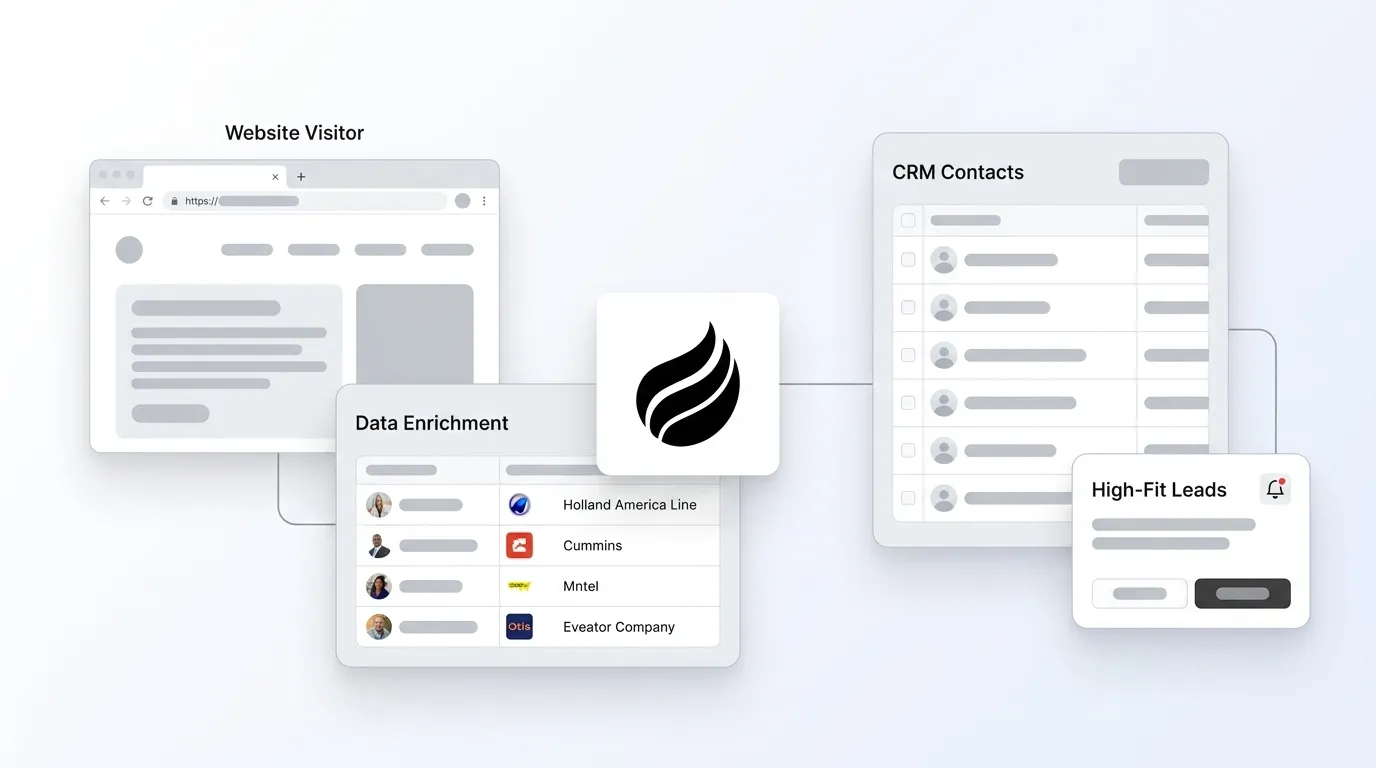
Website visitor tracking runs through a six-step pipeline that installs a JavaScript pixel, creates persistent identifiers via cookies and device signals, captures session behavior, and de-anonymizes companies through reverse-IP lookup and enrichment.
First-party cookies combined with server-side tracking remain the most reliable identifiers in 2026, as third-party cookies face increasing restrictions from browsers like Safari and consent requirements across 20 U.S. states.
Behavioral data collection now leans on server-side methods to bypass ad blockers and cookie limitations, which enables more accurate capture of page views, form interactions, and custom events.
Real-time routing of enriched visitor records into Slack or CRMs like Salesforce and HubSpot removes manual data entry and sharply improves response times for high-fit prospects.
Turn anonymous traffic into named CRM leads automatically with Coffee‘s visitor identification agent.
Step 1: Install and Verify the Tracking Script
The pipeline starts with a lightweight JavaScript snippet placed inside the <head> tag of every page. Installation typically takes under 30 minutes, and the platform then verifies that the script fires on page load before any downstream identification begins.
Once consent is secured, the choice of tracking architecture becomes critical.
2026 privacy note: first-party vs. third-party scripts. First-party scripts served from your own domain stay significantly more resilient than third-party scripts. Hybrid implementations that combine client-side JavaScript with server-side APIs achieve higher attribution accuracy than browser-based pixels alone because they bypass ad blockers and Intelligent Tracking Prevention.
Step 2: How Cookies and Tracking Scripts Work Together
The script creates a persistent identifier for each session as soon as it fires. Tracking requests automatically transmit the visitor’s IP address, referrer URL, timestamp, and User-Agent string to the tracking server, which logs events and may set or update first-party cookies for cross-session identity matching. When deterministic identifiers are unavailable, probabilistic device fingerprinting constructed from IP address and User-Agent patterns links events across sessions.
Step 3: Behavioral and Server-Side Data Collection
Each session generates a structured behavioral record that includes pages viewed, time spent per page, navigation flow, downloads, and form interactions, all tied together using tracking IDs from cookies or fingerprinting. Behavioral and session tracking records these events consistently across visits. Modern JavaScript-based scripts extend this baseline by capturing custom events including form submissions, button clicks, video plays, and scroll depth, which provide richer signals about visitor intent than page views alone.
Match rates vary materially by traffic composition. Realistic company-level match rates for B2B website visitor identification in 2026 range from 30–65% of US B2B traffic. Many knowledge workers browse from home networks that resolve to ISPs rather than company names, which is why modern platforms layer cookie graphs and enrichment data on top of IP signals.
That layering improves company-level match rates, but person-level identification remains a harder problem because it must match a visit to a specific individual rather than just their employer. For person-level identification, B2B visitor identification platforms typically achieve 5–40% person-level identification rates for US traffic. Person-level identification stays largely restricted to US traffic due to GDPR constraints.
Step 6: Buyer-Persona Matching for Precise Outreach
Company-level identification answers which organization visited your site. Buyer-persona matching answers which two or three people inside that organization a rep should contact today. This step cross-references the identified company against your defined ICP attributes such as title, seniority, function, and geography, then surfaces the individuals whose profiles match, along with their LinkedIn URLs and verified contact data.
Build people lists automatically with Coffee AI CRM Agent
Callout: Mismatched buyer-persona criteria. Persona matching is only as accurate as the ICP definition stored in the system. Vague criteria such as “director or above” without function or industry filters produce noisy lists that reps ignore. Define title, department, company size, and geography explicitly before enabling automated persona matching, and audit the output weekly against closed-won data to tighten the criteria over time.
Validate Data Quality and Measure Results
Three metrics together show whether the pipeline works, and they build on each other in sequence. First, company-level match rate should fall within the 30–65% range discussed earlier, while rates below 10% indicate a script installation problem or predominantly residential traffic. If your match rate looks healthy, the next question is data quality.
Second, enrichment completeness measures whether every routed record carries company name, industry, employee count, and at least one decision-maker contact before it enters the CRM. Incomplete records signal a data-provider gap that prevents reps from acting on the leads. Once you are matching companies and enriching them fully, the final test is business impact.
Third, pipeline created from visitor identification shows whether the system drives revenue. Analytic Partners grew qualified pipeline 40% year-over-year after deploying visitor tracking enriched with buying signals, which provides a benchmark against which teams can measure their own ramp.
Time saved per lead is the operational metric that justifies the investment. The 2% form conversion rate mentioned earlier means 98% of intent signals remain invisible without this pipeline, and only 2% of B2B website traffic converts into a lead via forms. Capturing even a fraction of that traffic as enriched CRM records, without manual entry, directly expands the denominator of opportunities available to the team.
Frequently Asked Questions
How long does initial setup typically take?
Most mid-market B2B SaaS teams have the full pipeline from pixel installation through CRM sync operational within one business day. Dropping the tracking script into a tag manager takes under 30 minutes. Connecting the platform to Salesforce or HubSpot via OAuth authentication adds another 15–30 minutes. Defining buyer-persona criteria and configuring Slack routing rules typically requires a 60-minute internal alignment session between Sales and RevOps. The longest variable is consent-banner configuration, which may require a legal review if the site serves visitors in multiple US states or the EU. Coffee’s Companion App authenticates directly against existing Salesforce or HubSpot instances, so no data migration or parallel CRM setup is required.
Who owns the visitor data once it reaches the CRM?
The business operating the website owns the first-party behavioral data collected by its own tracking script. Enrichment data such as firmographics, contact records, and LinkedIn profiles is licensed from third-party data providers and subject to those providers’ terms of service, which typically prohibit redistribution or resale. Once enriched records are written to Salesforce or HubSpot, they become part of that CRM instance and are governed by the organization’s data retention and deletion policies. Under CCPA and Virginia-model state laws, individuals retain the right to request deletion of their personal data, so CRM records derived from person-level identification must be reachable by the organization’s data-subject request workflow. Coffee does not use customer data to train public models, and the platform is SOC 2 Type 2 certified.
Can the same tracking script be used across multiple domains?
A single script can technically fire across multiple domains, but doing so requires careful configuration. First-party cookies are domain-scoped by default, which means a cookie set on domain-a.com is not readable on domain-b.com. Cross-domain session stitching requires either a shared subdomain, server-side identity resolution using a hashed email or CRM customer ID passed as a URL parameter at handoff, or a dedicated cross-domain linking parameter. Privacy implications also apply. Each domain must present its own consent notice, and the data collected on each domain must be disclosed separately in privacy policies. Rhode Island’s 2026 privacy law, for example, requires businesses to disclose named third parties with whom personal data is shared, not just categories, which makes a well-maintained vendor registry essential for multi-domain deployments.
How does the process scale when the sales team grows from 5 to 25 reps?
The technical pipeline itself scales without modification, while the operational challenge lies in routing logic and territory assignment. At five reps, a single Slack channel receiving all high-fit visitor alerts is manageable. At 25 reps, unstructured alerts create noise and missed follow-ups. The solution is CRM-native routing rules that assign enriched visitor records to the correct rep based on account ownership, territory, or round-robin logic, using the same rules that already govern inbound leads. Coffee’s agent writes visitor records directly into Salesforce or HubSpot with all enrichment pre-filled, so existing assignment rules apply automatically. Persona matching criteria should also be reviewed as the team grows. A five-rep team targeting one ICP segment can use broad criteria, while a 25-rep team with specialized verticals or named-account lists needs segment-specific persona definitions to keep each rep’s queue relevant and actionable.
Conclusion: Turn Anonymous Traffic into Outbound Opportunities Automatically
The six-step pipeline of script installation, persistent identifier creation, session capture, reverse-IP de-anonymization, real-time routing, and buyer-persona matching converts anonymous website traffic into named, enriched CRM leads without manual data entry. Each step includes a 2026 privacy consideration: consent-aware script deployment, first-party cookie resilience, server-side collection, legitimate-interest scoping for company-level identification, SOC 2-compliant routing, and ICP-defined persona matching that limits outreach to genuinely relevant contacts.
Coffee’s agent handles the final three steps of this pipeline autonomously: real-time routing, CRM sync, and Suggested Leads persona matching. Reps receive a Slack notification, click once to add the prospect with all enrichment pre-filled, and move directly to outreach on LinkedIn or email with no copy-pasting, no manual lookup, and no delay.