Written by: Doug Camplejohn, CEO & Co-Founder, Coffee
Key Takeaways: AI Agents That Clean Up CRM Chaos
- Sales teams lose 71% of time to manual CRM data entry. AI agents capture data from emails, calendars, and calls to save 8-12 hours weekly.
- AI agents turn messy, unstructured information into structured CRM records. They remove duplicates and preserve historical context unlike legacy systems.
- Implementation follows five clear steps: connect data sources, choose a no-code stack, define triggers, enable enrichment, and add human-in-loop safeguards.
- Coffee works as a standalone CRM for small teams or as a companion to Salesforce and HubSpot, with AI meeting bots and natural language queries.
- Real users report accurate forecasting and strong productivity gains. Get secure, predictable AI agent automation with Coffee.
Why AI Agents Finally Fix CRM Data Entry Hell
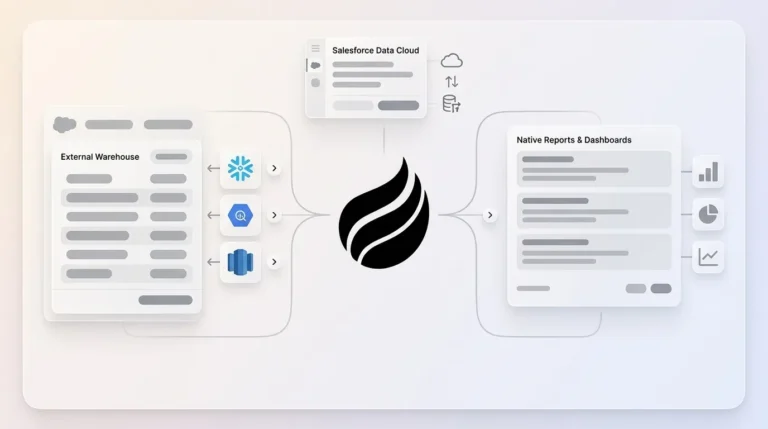
Traditional CRMs act as passive databases that wait for humans to enter structured data. AI agents behave as proactive systems that handle both structured and unstructured information. AI is only as good as the data it touches, and messy data simply scales the mess. Modern AI agents solve this problem by connecting to data warehouses that preserve historical context, unlike legacy systems where field updates erase previous information forever.
AI agents trigger automatically from sources like Gmail, Outlook, Google Calendar, Zoom transcripts, and meeting recordings. They read unstructured data such as email threads and call notes, then convert it into clean CRM records without human effort. Excessive manual data entry for logging calls and emails, combined with complex non-intuitive user interfaces, causes low CRM adoption and pushes sales teams to work around the system. Coffee follows a simple principle: good data in, good data out. The AI agent captures accurate information so your forecasts and pipeline reports match what is actually happening.
Key pain points that AI agents eliminate include:
- Custom field mapping across different data sources
- Voice-to-text integration from sales calls
- Duplicate contact management
- Activity logging across multiple touchpoints
- Lead enrichment from fragmented databases
Now that you can see what AI agents fix, the next step is putting them to work in a structured way inside your CRM.
5 Practical Steps To Implement AI Agents For CRM Data Entry
The following five-step blueprint takes you from manual data entry to automated capture with AI agents.
1. Connect Your Data Sources
Connect Google Workspace or Microsoft 365 to capture emails, calendar events, and document interactions. This connection supplies the raw data stream your AI agent uses to identify prospects, customers, and sales activities automatically.
2. Choose Your Technology Stack
Start with a simple no-code setup using Zapier connected to OpenAI for basic automation. Teams that want deeper control can deploy a purpose-built agent platform like Coffee, which manages the complex logic, storage, and error handling behind the scenes.
3. Define Triggers and Data Parsing
Create automated triggers for new emails, calendar invites, and meeting recordings. Then configure JSON output schemas for structured data extraction, such as: {"contact": {"name": "John Smith", "company": "TechCorp", "email": "john@techcorp.com", "title": "VP Sales"}, "activity": {"type": "email", "date": "2026-03-30", "summary": "Discussed Q2 pricing proposal"}}. This structure keeps contact and activity data consistent across every record.
4. Enable Data Enrichment and Activity Logging
Configure your agent to enrich contact records with job titles, company information, and LinkedIn profiles. Then enable activity logging that updates fields like “last activity” and “next activity” so deal stages stay current without manual updates.
5. Implement Human-in-Loop Safeguards
AI automation tools benefit from incorporating human-in-the-loop reviews of outputs before final actions to handle edge cases intelligently. Set up approval workflows for high-value deals or sensitive data changes, while allowing routine entries to flow through automatically.
Start your 5-step implementation with Coffee’s no-code setup and skip complex technical configuration.
No-Code Stacks Compared To The Coffee Agent Blueprint
Basic Zapier and OpenAI integrations deliver entry-level automation but lack specialized data warehouse architecture and historical tracking tuned for enterprise sales operations. These simple stacks often break when workflows grow more complex.
Coffee’s agent-first architecture automatically creates and enriches contacts from email signatures, calendar invitations, and meeting participants. The system logs all activities in a built-in data warehouse that preserves historical context, unlike traditional CRMs that overwrite previous field values and lose the story behind each deal.

Coffee works as a standalone CRM for small businesses that have outgrown spreadsheets and also as a companion agent for existing Salesforce or HubSpot setups. Pro features include AI meeting bots that join calls automatically, pipeline comparison visuals that highlight week-over-week changes, and natural language list building that runs commands like “Find VPs of Sales at $10M+ funded companies using Salesforce.”

Companion Setup: Coffee With Salesforce Or HubSpot
Coffee connects as a companion agent with a simple authentication to your existing Salesforce or HubSpot instance. The agent reads your current data structure, then enriches records and writes back insights without forcing your team to change daily workflows.
Key companion features include automated briefings before meetings, BANT and MEDDIC qualification summaries, and intelligent list building using natural language queries. As noted in the implementation steps, human oversight remains critical for edge cases, and Coffee’s draft-and-review approach ensures AI-generated insights are validated before finalization. Coffee’s data warehouse architecture supports this review by maintaining complete interaction histories even when CRM fields change. This unified approach reduces the need for separate tools like ZoomInfo for enrichment or Gong for conversation intelligence.

Real Results And Pro Tips From Coffee Users
One company generating tens of millions in revenue managed sales through spreadsheets before adopting Coffee’s AI agent. The team rejected Salesforce and HubSpot because of manual overhead and chose Coffee for automatic contact creation from Google Workspace and Pipeline Compare features that automated weekly reviews. The result was the same 8-12 hour weekly time savings mentioned earlier, plus accurate forecasting based on consistently clean data.
AI saves sales and marketing professionals an average of 12 hours per week, delivering the productivity gains highlighted in the key takeaways. Organizations that successfully scale AI agents report more than two times greater pipeline expansion compared to peers.
Pro tips for rollout include confirming SOC2 compliance for enterprise security, keeping human review in place for high-value transactions, and tracking pipeline ROI metrics that clearly show business impact. Coffee’s draft-and-review model supports these safeguards while still removing most manual entry.
Start saving 8-12 hours per week with Coffee and bring the same productivity gains to your sales organization.
Frequently Asked Questions About Coffee
How does Coffee compare to Day.ai and Clarify for CRM automation?
Coffee offers deeper integrations and a data warehouse architecture that works both as a standalone CRM and as a companion to Salesforce or HubSpot. Day.ai focuses mainly on unstructured data productivity, while Clarify lacks comprehensive integration capabilities for established teams. Coffee handles both structured and unstructured data with preserved historical context. This dual model lets you start with Coffee as your primary CRM or layer it onto your existing system without migration risk.
Is Coffee secure enough for mid-market companies?
Yes, Coffee is SOC 2 Type 2 and GDPR compliant. The platform does not use your data to train public models, which keeps sensitive information protected.
How does Coffee’s pricing work for AI agent automation?
Coffee uses simple seat-based pricing where you pay for human users while the AI agent’s unlimited labor is included. You avoid complex metering on AI usage, API calls, or data processing volume. This predictable model makes budgeting for CRM automation straightforward as your agent takes on more data entry work.
Should I use Coffee as a standalone CRM or companion to my existing system?
The right choice depends on your current tools and team size. Small companies with 1-20 employees that have outgrown spreadsheets but find traditional CRMs too manual can use Coffee as a standalone CRM. Mid-market teams already committed to Salesforce or HubSpot can deploy Coffee as a companion agent that improves data quality and reduces manual entry without disrupting existing workflows. Both options deliver the same core benefit: AI agents handle data entry so your team can focus on selling.
What integrations does Coffee support for automated data capture?
Coffee connects to Google Workspace or Microsoft 365 for email and calendar data, and integrates with Zoom, Teams, and Meet for call recordings and transcripts. The platform supports Zapier connections for additional tools. Deeper native integrations are on the roadmap and will extend automated data capture further.
Conclusion: Turn Your CRM Into A Reliable Revenue Engine
Automating CRM data entry with AI agents turns your sales operation from a manual data burden into a strategic revenue engine. By following the five-step blueprint above, you save 8-12 hours per week while maintaining clean pipeline data that supports accurate forecasts and better decisions. Whether you choose a standalone AI-first CRM or deploy agents as companions to Salesforce or HubSpot, the goal stays the same. You move from “bad data in, bad data out” to an automated system that captures and structures information with minimal human effort.
Deploy your AI agent blueprint this week and transform your CRM from a data graveyard into a competitive advantage, then book a demo to see how Coffee automates your specific workflows and delivers the clean pipeline data your team needs to exceed revenue targets.