Written by: Doug Camplejohn, CEO & Co-Founder, Coffee
Why Mid-Market CRM Automation Breaks
- CRM automation fails at mid-market scale because of poor data quality. Automation multiplies whatever data already exists.
- Mid-market teams face unique constraints: multiple sales motions, limited admin resources, and integration sprawl across six or more disconnected tools.
- Every major CRM platform (HubSpot, Salesforce, Dynamics 365, Zoho, Pipedrive) assumes someone is keeping records complete. When that assumption breaks, workflows misfire silently.
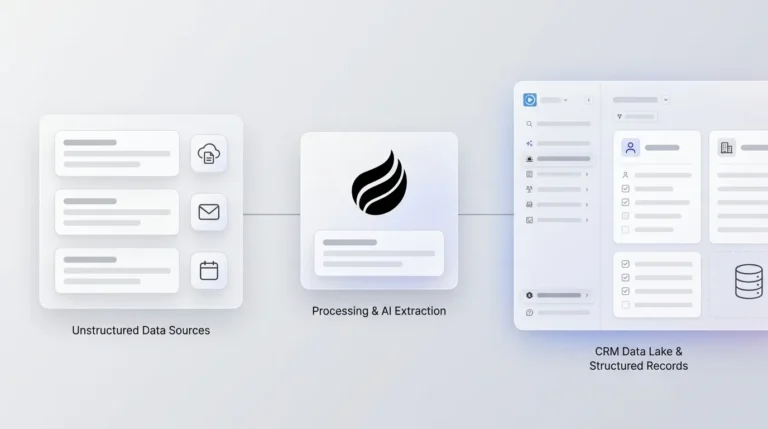
- An agent-led data-in layer that automatically creates, enriches, and logs activity from email, calendar, and call transcripts gives downstream automations clean inputs.
- Coffee delivers this agent-led data layer as either a Standalone AI-First CRM or Companion App on Salesforce or HubSpot, removing the manual data work that breaks automation.
See How Coffee Cleans Your CRM Data
The Mid-Market Automation Precondition
Automation quality tracks directly with data quality. Automation should not trigger if a contact record lacks an owner, phone number, or deal stage, because incomplete records create orphaned tasks. When adoption is low and activity data is missing, workflows fire on incomplete records and produce bad outputs. Routing goes to the wrong rep, scoring highlights the wrong lead, and forecasts drift away from reality.
“Mid-market” describes an operational constraint set as much as a company size. Multiple sales motions run at the same time, so a single workflow rarely fits every deal. Admin scarcity means one person owns everything and cannot be replaced easily. Integration sprawl across six or more tools means data enters the CRM through paths no one fully controls. RevOps teams have hit the integration ceiling when more than a third of their capacity goes to maintaining integrations rather than improving revenue operations. Each constraint makes the data-in problem worse.
Coffee’s core belief, “you can’t have good AI with bad data,” shapes the fix. The Coffee Agent ingests and structures ground-truth data from email, calendar, and call transcripts so every downstream automation has clean inputs to work with. For more on how this applies at smaller scale, see CRM Automation For Small Business: Eliminate Manual Entry.
Mid-Market CRM Automation Capabilities That Matter
Specific automation capabilities matter more than raw feature counts at mid-market scale. Core CRM automation capabilities to evaluate include:
- Lead Routing, which ensures inbound volume reaches the right rep without manual triage.
- Enrichment And Scoring, which fills firmographic and behavioral gaps so prioritization reflects reality.
- Deal-Stage Triggers, which keep pipeline state current without rep intervention.
- Stale-Opportunity Alerts, which surface deals that have gone quiet before they distort the forecast.
- Approval Workflows, which enforce discount and contract guardrails across multiple sales motions.
- Renewal Plays, which automate expansion and retention timing for accounts past initial close.
- CS Handoffs, which move context from sales to success without a manual recap.
- Forecast Updates, which keep projections tied to actual activity rather than rep optimism.
- Data Hygiene, which deduplicates and standardizes records so downstream automation does not misfire.
- Cross-System Automation, which connects CRM to marketing, billing, support, and Slack or Teams so one record change propagates correctly.
The platforms below are evaluated against these capabilities. For a startup-focused lens on the same toolset, see CRM Automation Tools For Startup Sales Teams In 2026.
Platform-By-Platform Evaluation
Each platform below is assessed on automation strengths, primary tradeoff, and the team profile it fits best. Read the table with one question in mind: does any platform solve the data-in problem on its own? That answer shapes the recommendation that follows.
| Platform | Documented Automation Strength | Primary Tradeoff | Team Profile It Fits |
|---|---|---|---|
| HubSpot | Unified marketing-sales-service data model, visual workflow builder, lead routing via Rotate record to owner, lead scoring, Sequences | HubSpot’s full workflow builder and advanced branching require Professional or Enterprise tiers, and HubSpot’s contact-based pricing means total cost of ownership grows nonlinearly with contact database size | Marketing-led mid-market teams already invested in inbound, teams wanting a unified hub without heavy admin |
| Salesforce | Deep customization, omnichannel routing, complex multi-step approvals, duplicate and matching rules, Agentforce agents | High complexity requires a dedicated admin or onboarding budget. Certified admin and developer resources cost $120–$200 per hour. | Enterprise-adjacent teams with complex deal structures, dedicated RevOps, and budget for administration |
| Dynamics 365 | Intent-driven routing combining intent and skill-based routing in a single ruleset, predictive lead scoring and Sales Qualification Agent | The Microsoft estate rewards stack fit. Integrations built on unsupported methods break on platform updates. | Microsoft-first organizations already running M365, Teams, and Azure, teams needing ERP-CRM sync via Dual-write |
| Zoho CRM | Workflow rules with immediate and time-based actions, assignment rules with up to 25 criteria per rule entry and round-robin distribution, scoring rules and Zia AI record owner suggestions | Interface density can overwhelm new users, and support quality varies by tier. | Cost-conscious mid-market teams already in the Zoho ecosystem, teams needing broad automation at lower per-seat cost |
| Pipedrive | Trigger-and-action automations across six entities, wait-for-conditions and if or else branching, Sequences for structured communication | Workflow automation and Sequences require Growth and higher plans, and Sequences cap at 10 steps and 250 enrolled items. | Sales-led SMB and lower mid-market teams that prioritize pipeline visibility over marketing automation depth |
The recurring gap across all five platforms is the data-in layer. Workflows are only as good as your CRM data. Every platform assumes someone, whether a rep, an admin, or an integration, is keeping records complete. When that assumption breaks, automation misfires silently.
Best Automated CRM Solutions For Mid-Sized B2B Sales Teams covers the platform selection decision in additional depth for teams still narrowing their options.
Compare Coffee To Your Current Stack
Coffee As The Data-In Layer That Makes Automation Work
The recurring data-in gap is exactly what Coffee was built to close. Coffee operates in two models. The Standalone AI-First CRM deploys the Coffee Agent as the system of record. The agent handles contact creation, enrichment, activity logging, and pipeline intelligence natively. The Companion App deploys the Coffee Agent on top of existing Salesforce or HubSpot installations and handles the data-in process so the incumbent system stays accurate without human effort.

Several mechanisms matter most for mid-market buyers evaluating Coffee:

- Automatic Contact And Company Creation from Google Workspace or Microsoft 365. The agent scans emails and calendars to populate the CRM without rep input, which keeps records complete.
- Enrichment Via Licensed Data Partners. Job titles, funding, and LinkedIn profiles are appended automatically, so reps do not need separate tools like Apollo or ZoomInfo for basic context.
- Autonomous Activity Logging. Last activity and next activity stay current because the agent logs them. Reps do not spend time backfilling calls and meetings.
- AI Meeting Briefings And Summaries. The agent prepares reps before calls and generates structured summaries, action items, and follow-up drafts afterward, which feeds consistent data back into the CRM.
- Sales Methodology-Structured Notes. BANT, MEDDIC, and SPICED frameworks are applied automatically so qualification data enters the system in a consistent format that automation can use.
- Pipeline Compare. Week-over-week pipeline intelligence highlights progressed deals, stalled opportunities, and new additions without spreadsheets, which gives leaders a reliable view of change.
- Customizable summary templates writable back to Coffee, HubSpot, or Salesforce, confirmed in Coffee’s November 2025 product update, so teams can align summaries with their internal processes.
Coffee is SOC 2 Type 2 and GDPR compliant and does not train public models on customer data. Pricing is seat-based. Teams pay for human seats, and the agent’s unlimited labor is included, so there is no consumption metering on LLM usage or processes.

Review Coffee Pricing And Plans
The Admin And Maintenance Reality
Every automation has an owner after launch, and in mid-market companies that owner is usually one person. Recurring lines, including license, support, administration, and AI, typically make up 65–75% of five-year CRM total cost of ownership, and internal CRM administration for mid-market deployments often becomes the largest single line item, exceeding license spend within two years. When that admin leaves, admin turnover costs $10K–$50K per occurrence in retraining or outsourcing.
When automation behaves unpredictably, sales teams quietly stop trusting it, double-check everything manually, build unofficial workarounds, and eventually stop updating the CRM consistently. That pattern turns a CRM automation problem into a CRM adoption problem that is significantly harder to recover from. Coffee’s agent-led model reduces this maintenance burden directly. Because the agent handles data entry and enrichment instead of requiring humans to keep workflows fed, broken triggers and orphaned records become rare, and the admin spends less time firefighting.
Agentic Automation In 2026
The 2026 automation landscape has shifted from rule-based workflows to AI agents that act autonomously. Agentic CRM systems interpret context, reason over customer data, identify the right action for the situation, and adjust their approach based on outcomes rather than matching conditions to outputs. Autonomous lead qualification, predictive scoring, and agent-led data capture now operate at scale. Sixty-eight percent of organizations are already scaling AI across revenue functions, and early adopters report 41% higher conversion rates and 45% reductions in manual work.
Most 2026 competitor content still frames automation as workflow builders and sequences, a rule-based mental model that predates the agent shift. Coffee is built as a proactive agent that acts on data instead of waiting for humans to maintain it. Coffee’s Intelligence layer, introduced in February 2026, allows users to define and store deep context on business model, product specifics, ICP, and competitors for tailored AI suggestions and insights. Rule-based workflow tools cannot replicate that depth of contextual reasoning.
CRM Automation Vs. Marketing Automation Platforms
Mid-market teams often struggle to draw a clear line between CRM automation and marketing automation. CRM automation governs sales-side processes such as lead routing, deal-stage progression, rep task creation, pipeline forecasting, and CS handoffs. Marketing automation governs demand-side processes such as campaign sequencing, lead nurturing, audience segmentation, and attribution. The overlap zone, which includes lead scoring, lifecycle stage management, and outbound sequences, is where most mid-market teams get tangled.
HubSpot’s unified data model means workflows automatically have the latest contact and deal data without separate synchronization, which is why it blurs the line by design. Salesforce requires deliberate integration between Marketing Cloud and Sales Cloud to achieve the same result. Coffee closes this loop differently. Its Campaigns feature runs multi-step, AI-generated email sequences natively from the rep’s own mailbox with stop-on-reply, so lead discovery, enrichment, outreach, and CRM logging happen inside one agent without a separate marketing automation platform.
Decision Guide: How To Evaluate CRM Automation For Your Team
Three factors determine which path fits your team best:
- Team Size: Under 50 users, the admin overhead of Salesforce or Dynamics typically exceeds the value. HubSpot, Zoho, or Pipedrive are more operationally appropriate, or Coffee as a standalone system. Teams with 50–200 users sit in the sweet spot for Coffee’s Companion App on top of an existing HubSpot or Salesforce instance. Above 200 users with complex customizations, a hybrid model that pairs the platform with Coffee as the data-in layer usually works best.
- Sales-Led Vs. Marketing-Led: Sales-led teams need deal-stage triggers, activity logging, and pipeline intelligence first, which align with Coffee’s core strengths. Marketing-led teams need campaign orchestration and lead nurturing depth. HubSpot’s unified model or Salesforce Marketing Cloud cover those needs, with Coffee handling the data-in layer so those campaigns fire on clean records.
- Legacy Tools To Migrate From: Teams on Salesforce or HubSpot that cannot migrate can use Coffee’s Companion App as the lowest-friction path. This approach avoids rip-and-replace and retraining while the agent handles work humans were failing to do. Teams on spreadsheets or a lightweight CRM that are ready to modernize can adopt Coffee’s Standalone CRM as a direct path.
A practical summary is simple. Teams with admin scarcity and low rep adoption should solve the data-in problem before adding more workflow complexity. More automation on top of bad data produces bad outputs faster. Coffee’s agent-led model addresses the precondition that every other platform assumes is already solved.
Talk To Coffee About Your Automation Plan
Frequently Asked Questions
How Much Does CRM Automation Cost At Mid-Market Scale?
License fees represent only a fraction of the real number. Recurring lines, including license, support, administration, and AI, typically make up 65–75% of five-year CRM total cost of ownership. For a 50-user mid-market deployment over three years, total CRM cost of ownership ranges from roughly $330K–$720K for HubSpot to $480K–$1.0M for Salesforce when all eight cost categories are included. Admin salary is often the largest single line item. A dedicated full-time CRM administrator costs $80,000–$130,000 per year in base salary, rising to $82,000–$168,000 in true annual cost when benefits, tools, and overhead are included. AI add-on or consumption pricing adds $125–$550+ per user per month on top of base licenses, which makes it the fastest-growing and least predictable CRM budget line in 2026. Coffee’s seat-based pricing, where the agent’s unlimited labor is included, removes the consumption metering variable entirely.
Do You Need A Dedicated Admin To Run CRM Automation?
High-complexity platforms like Salesforce and Dynamics 365 typically require 1.0–2.0 FTE for ongoing admin, governance, and user support. Low-code and no-code platforms like Zoho require 0.25–0.5 FTE. The hidden risk is not the steady-state cost but the turnover cost. When a certified admin leaves, institutional knowledge leaves with them, and the turnover cost mentioned earlier, up to $50K per occurrence, becomes the real risk. Agent-led models like Coffee reduce this burden because the agent handles data entry and enrichment. The maintenance surface shrinks because the agent performs work that would otherwise require human enforcement.
How Do You Automate Lead Routing And Follow-Up Without Adding Headcount?
Clean data is the prerequisite. As established earlier, incomplete records create orphaned tasks, so the routing fires but nothing useful happens on the other end. The data-in layer must be solved first. Once records are complete and current, lead routing works reliably. HubSpot uses its Rotate record to owner action, Zoho uses assignment rules with round-robin distribution, and Salesforce uses omnichannel routing. Without that foundation, adding more routing logic accelerates the failure because bad leads reach the wrong rep faster. Coffee’s agent solves this by automatically creating and enriching contacts from email and calendar activity, so routing rules always have the fields they need to fire correctly. The result is automated follow-up that works without adding headcount to maintain the data those automations depend on.
Read Next
- Best Automated CRM Solutions for Mid-Sized B2B Sales Teams
- CRM Automation for Small Business: Eliminate Manual Entry
- CRM Automation Implementation Best Practices for Sales Teams
- AI CRM for Sales: Boost Your Team with Smart Tools and Automation
- CRM Automation vs Traditional CRM: 2026 Benefits for Sales